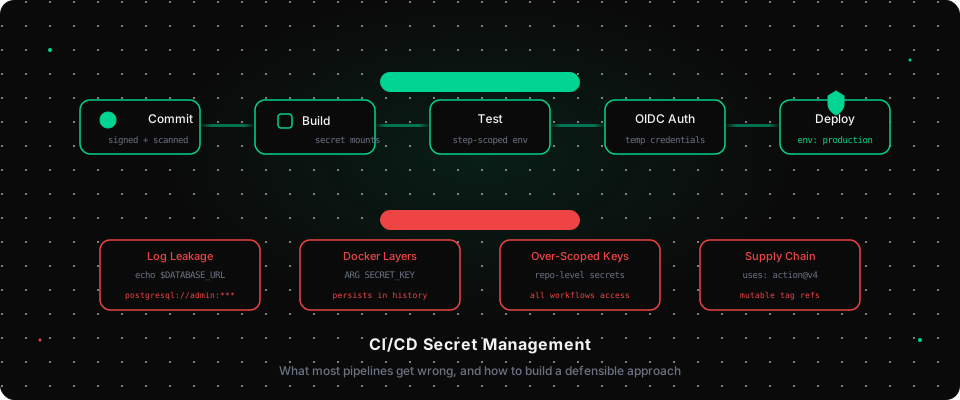
Your CI/CD pipeline is one of the most privileged systems in your infrastructure. It has credentials to push container images, deploy to production clusters, call external APIs, and access your database. It runs on every commit, often with minimal human oversight.
It is also one of the most poorly secured systems in most organizations.
This is not because engineers are careless. It is because the default ergonomics of CI/CD platforms optimize for convenience, and the failure modes are subtle. Secrets leak silently. Access is broader than necessary. Masking rules provide false confidence. By the time the problem surfaces, it is often in an incident report.
This article covers the actual failure patterns, with specific examples from GitHub Actions, which is where most of this plays out today, and what a more defensible approach looks like.
The Core Problem: CI/CD Has Too Much Access and Too Little Oversight
In a typical setup, a single set of credentials handles every deployment target, every environment, every stage of the pipeline. The AWS access key that deploys to production is the same one that runs unit tests. The database URL that seeds test data points at staging because someone forgot to configure it per environment.
This is not a hypothetical. It is the default.
The blast radius of a compromised CI secret is significant. An attacker who can inject code into a workflow, through a dependency update, a malicious contributor, or a supply-chain compromise, can exfiltrate every secret available to that pipeline. In 2025, the GhostAction attack compromised 327 accounts and exfiltrated 3,325 distinct secrets from CI pipelines precisely because those secrets were broadly scoped and accessible to any workflow in the affected repositories.
How Secrets Actually Leak in Pipelines
Log Leakage
The most common and least glamorous failure mode: a secret ends up in a log.
This happens in several ways:
Explicit printing. Debug statements left in accidentally:
# Meant to debug a connection issue; left in the pipeline
echo "Connecting to $DATABASE_URL"
Error message exposure. When a process fails, it sometimes prints the command it ran, including arguments that contained secret values:
Error: command failed with exit code 1
  /bin/sh -c psql postgresql://admin:actualpassword@db.internal/prod -c "SELECT 1"
Third-party tool output. Tools that helpfully echo their configuration on startup, including environment variables that were passed to them.
Step summary capture. GitHub Actions job summaries and workflow annotations can inadvertently capture environment variable values if they include diagnostic output.
CI platforms like GitHub Actions attempt to mitigate this by masking registered secrets in log output. When you define a repository secret, GitHub redacts its value if it appears in logs verbatim. But masking has real limits.
If the secret appears URL-encoded, base64-encoded, or as part of a longer string with concatenation, masking will not catch it:
# Secret value: "mypassword"
# GitHub masks "mypassword" in logs

# But this is not masked:
echo $(echo -n $SECRET | base64)
# Output: bXlwYXNzd29yZA==  ← visible in logs

# Nor is this:
CONN_STRING="postgresql://user:${DB_PASS}@host/db"
echo $CONN_STRING  # mask applies to DB_PASS value, but not to the constructed string
Masking is a safety net, not a security control.
Secrets in Artifact Layers
Docker image builds in CI are another common leakage vector. When environment variables are passed via ARG or ENV, they persist in the image's layer history even if the final image doesn't surface them at runtime:
# This pattern is found in thousands of real Dockerfiles
ARG DATABASE_URL
ENV DATABASE_URL=$DATABASE_URL

RUN python manage.py migrate  # runs with DATABASE_URL in the environment
Anyone with docker pull access to the image can run docker history <image> or docker inspect and recover the value. If you push that image to a public registry, or even a registry with overly permissive access, the secret is effectively public.
The correct approach is Docker BuildKit's secret mounts:
# Secret is available during the build step but never written to a layer
RUN --mount=type=secret,id=db_url \
    DATABASE_URL=$(cat /run/secrets/db_url) python manage.py migrate
Pass the secret at build time:
docker buildx build \
  --secret id=db_url,env=DATABASE_URL \
  -t myapp:latest .
The value never appears in docker history. It is not stored in the image manifest. This is the production-correct pattern.
Over-Scoped Repository Secrets
GitHub Actions has three levels of secret scoping: repository secrets, environment secrets, and organization secrets. In practice, almost everything ends up as a repository secret because that is the path of least resistance.
Repository secrets are accessible to any workflow in the repository. That includes workflows triggered by pull requests from forks. By default, GitHub restricts this for public repositories, but private repositories and self-hosted runners have different default behaviors.
More commonly, the scoping problem is not about external attackers but about internal risk surface. If every workflow in the repository can access the production deployment credential, then a bug in a test workflow, a dependency that runs arbitrary code, or a compromised action from the marketplace can access that credential. Restricting production credentials to environment-scoped secrets adds meaningful friction to this path.
# Instead of this:
jobs:
  deploy:
    runs-on: ubuntu-latest
    steps:
      - uses: actions/checkout@v4
      - run: ./deploy.sh
        env:
          AWS_ACCESS_KEY_ID: ${{ secrets.AWS_ACCESS_KEY_ID }}

# Use environment scoping:
jobs:
  deploy:
    runs-on: ubuntu-latest
    environment: production  # requires approval, restricts to production secrets
    steps:
      - uses: actions/checkout@v4
      - run: ./deploy.sh
        env:
          AWS_ACCESS_KEY_ID: ${{ secrets.AWS_ACCESS_KEY_ID }}
With the environment field set, you can configure required reviewers, deployment branch restrictions, and separate secret namespaces per environment. Production secrets are only accessible to workflows explicitly running against the production environment.
The Better Approach: OIDC Federation
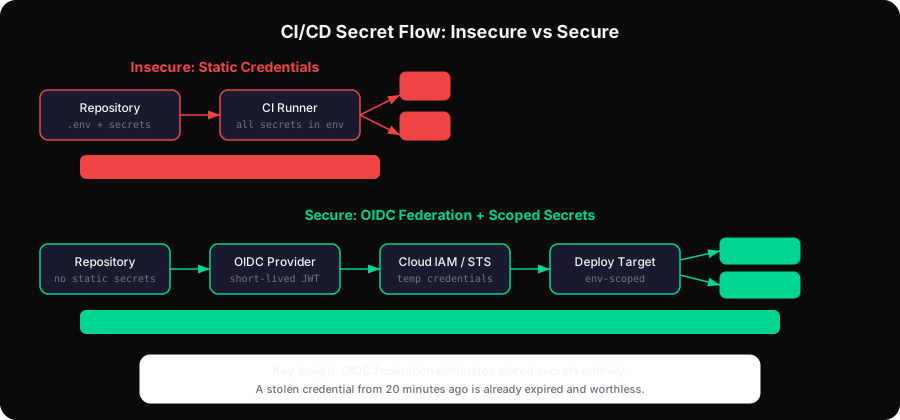
Static long-lived credentials in CI/CD are the root problem. They can be stolen from logs, exfiltrated from memory, committed accidentally, and they never expire on their own.
OpenID Connect (OIDC) federation eliminates the need for long-lived credentials entirely. Instead of storing an AWS access key in GitHub secrets, you configure AWS to trust GitHub's identity provider and issue temporary credentials at runtime.
The flow:
- GitHub generates a short-lived JWT for the workflow run, signed by GitHub's identity provider
- The workflow exchanges that JWT for temporary AWS credentials via STS
- The temporary credentials expire after the workflow completes (typically 15 minutes to 1 hour)
No static credentials are stored anywhere. There is nothing to steal and nothing to rotate. A credential that was valid for a specific workflow run 20 minutes ago is already expired and worthless.
Here is the full setup for AWS:
AWS trust policy (applied to the IAM role):
{
  "Version": "2012-10-17",
  "Statement": [
    {
      "Effect": "Allow",
      "Principal": {
        "Federated": "arn:aws:iam::123456789012:oidc-provider/token.actions.githubusercontent.com"
      },
      "Action": "sts:AssumeRoleWithWebIdentity",
      "Condition": {
        "StringEquals": {
          "token.actions.githubusercontent.com:aud": "sts.amazonaws.com"
        },
        "StringLike": {
          "token.actions.githubusercontent.com:sub": "repo:your-org/your-repo:environment:production"
        }
      }
    }
  ]
}
Note the sub condition. It scopes the trust relationship to a specific repository and environment. A compromised workflow in a different repository cannot assume this role. A workflow running against the staging environment cannot assume the role scoped to production.
GitHub Actions workflow:
permissions:
  id-token: write # required to request the JWT
  contents: read

jobs:
  deploy:
    runs-on: ubuntu-latest
    environment: production
    steps:
      - uses: aws-actions/configure-aws-credentials@v4
        with:
          role-to-assume: arn:aws:iam::123456789012:role/GitHubActionsDeployRole
          aws-region: us-east-1
          # No access keys. No secret storage. No rotation required.
GCP Workload Identity Federation, Azure, and HashiCorp Vault all support equivalent OIDC federation patterns. The investment in setup pays off immediately: you eliminate an entire category of secret management overhead.
Scoping Secrets to Individual Steps
Even when OIDC is not possible, whether due to legacy systems, providers that do not support it, or organizational constraints, there is a structural improvement worth making: scope secrets to the step that actually needs them, not to the entire job.
GitHub Actions allows environment variables to be defined at the job level or at the step level. Job-level environment variables are available to every step in that job, including steps that do not need them:
# Broad: every step in this job can access DATABASE_URL
jobs:
  test:
    runs-on: ubuntu-latest
    env:
      DATABASE_URL: ${{ secrets.DATABASE_URL }}
    steps:
      - uses: actions/checkout@v4
      - run: npm install # does not need DATABASE_URL, but has access to it
      - run: npm test # does need DATABASE_URL
A compromised action in the npm install step has access to DATABASE_URL. Tighten this:
# Narrow: DATABASE_URL is only available to the step that uses it
jobs:
  test:
    runs-on: ubuntu-latest
    steps:
      - uses: actions/checkout@v4
      - run: npm install # no access to DATABASE_URL
      - run: npm test
        env:
          DATABASE_URL: ${{ secrets.DATABASE_URL }}
This is a small discipline change that meaningfully reduces the exposure window.
Third-Party Actions: The Supply Chain Risk
Every uses: directive in a workflow pulls code from GitHub and executes it with access to your secrets. This is a significant supply-chain risk that is easy to underestimate.
In 2024 and 2025, multiple popular GitHub Actions were compromised through maintainer account takeovers and malicious pull requests. When an action is compromised, every repository that uses it and happens to run a workflow during the compromise window exposes its secrets to the attacker.
There are three mitigations worth applying consistently:
Pin actions to a full commit SHA, not a tag:
# Vulnerable: the tag can be moved to point at malicious code
- uses: actions/checkout@v4

# Safe: this exact commit cannot be silently changed
- uses: actions/checkout@a5ac7e51b41094c92402da3b24376905380afc29
Tags like v4 are mutable references. A maintainer, or an attacker who has taken over a maintainer's account, can move the tag to a different, malicious commit. Pinning to a SHA means your workflow runs the exact code you audited.
Limit permissions at the workflow level:
permissions:
  contents: read # minimal; add only what the workflow actually needs

jobs:
  test:
    runs-on: ubuntu-latest
    # Override at job level if more permissions are needed here
    permissions:
      contents: read
By default, GitHub Actions grants workflows a permissive token. Explicitly declaring minimal permissions limits what a compromised action can do.
Audit your action dependencies. Tools like StepSecurity's harden-runner and Chainguard's wolfi-base can enforce network egress policies at the runner level, blocking actions from exfiltrating secrets over unexpected network paths. For high-security environments, self-hosted runners with strict egress rules provide the most control.
Validating Secrets Before They Reach Your Pipeline
One pattern that is underused: validate at build time that secrets are present and correctly formatted before any deployment step executes.
In GitHub Actions, this looks like:
steps:
  - name: Validate required secrets
    run: |
      required_secrets=(
        "DATABASE_URL"
        "STRIPE_SECRET_KEY"
        "DEPLOY_TOKEN"
      )
      for secret in "${required_secrets[@]}"; do
        if [ -z "${!secret}" ]; then
          echo "ERROR: Required secret $secret is not set"
          exit 1
        fi
      done
      echo "All required secrets are present"
    env:
      DATABASE_URL: ${{ secrets.DATABASE_URL }}
      STRIPE_SECRET_KEY: ${{ secrets.STRIPE_SECRET_KEY }}
      DEPLOY_TOKEN: ${{ secrets.DEPLOY_TOKEN }}
This fails fast and visibly, before any deployment work begins. It also gives you a single location to audit which secrets a pipeline actually requires.
For type-level validation, checking that DATABASE_URL is a valid connection string, that STRIPE_SECRET_KEY starts with sk_live_ in production, a small validation script run as the first step catches misconfiguration errors before they cause cryptic runtime failures downstream.
Audit Logging: Knowing When Secrets Were Used
Most CI/CD secret implementations have no audit trail. You can see that a secret exists. You cannot easily see when it was used, by which workflow, or whether it was accessed by a step that should not have needed it.
This makes post-incident investigation difficult. If you discover a credential was leaked, you want to know: which workflows ran while it was valid, what those workflows did, and whether any unexpected access patterns appeared.
GitHub's audit log (available on Enterprise plans) captures secret access at the organization level. For more granular visibility, structured logging within workflows, logging which secret names are accessed, not their values, provides an audit trail that persists outside the CI system:
- name: Log secret access
  run: |
    echo "Secrets accessed in this job: DATABASE_URL, STRIPE_SECRET_KEY" >> $GITHUB_STEP_SUMMARY
    echo "Environment: ${{ inputs.environment }}" >> $GITHUB_STEP_SUMMARY
    echo "Triggered by: ${{ github.actor }}" >> $GITHUB_STEP_SUMMARY
    echo "Commit: ${{ github.sha }}" >> $GITHUB_STEP_SUMMARY
This is not a replacement for proper audit logging infrastructure, but it creates a record within the workflow's own log output that survives the run.
Practical Checklist
Before closing, a concrete checklist for auditing an existing pipeline:
Access and scope:
- Production credentials are scoped to a
productionenvironment with required reviewers - Secrets are defined at the step level where possible, not the job level
- OIDC federation is used instead of static credentials for cloud deployments
- Organization-level secrets are scoped by repository access policy
Supply chain:
- External actions are pinned to full commit SHAs
- Workflow permissions are explicitly declared and minimal
- A dependency review action blocks new high-risk dependencies in PRs
Leak prevention:
- Docker builds use BuildKit secret mounts, not
ARG/ENV - No
echoor debug output in workflow steps that access secrets - Secret masking is configured but not relied on as primary protection
Rotation and lifecycle:
- Static credentials have documented rotation schedules
- Offboarding process includes rotation of any credentials accessible to departing team members
- Secret access patterns are audited periodically
None of these are difficult individually. The challenge is consistency: applying them to every repository, every pipeline, every new secret added over time.
The Systemic Problem
CI/CD secret management failures are, at root, a systemic problem rather than a technical one. The individual steps are all understood: use OIDC, scope by environment, pin action versions, avoid logging secrets. The gap is in applying them consistently across a codebase that grows over time, with different engineers each making configuration decisions.
That gap is exactly where the risk lives. A pipeline that was configured correctly two years ago may have accumulated new steps, new dependencies, and new secrets that were added under time pressure without the same care. The production credential that was originally scoped narrowly may have been broadened to fix a one-off deployment problem.
Treating CI/CD secret configuration as infrastructure code, version-controlled, reviewed, and audited on a schedule, closes most of that gap. Every workflow file that references secrets.SOME_CREDENTIAL is a configuration decision that deserves the same scrutiny as the application code it deploys.
If you're finding that your team manages CI/CD secrets inconsistently across repositories, with different rotation schedules, unclear ownership, and secrets passed around without central visibility, that's a tooling and process gap worth addressing directly. The principles here apply regardless of which tooling you use, but having a centralized place to manage, rotate, and audit credentials makes consistent enforcement tractable.