Environment variables are the primary mechanism for keeping secrets out of source code. Every developer uses them, but few teams have thought carefully about how to manage them well across the full lifecycle of an application.
This guide covers the principles that separate good secret management from the mess most teams end up with.
1. Never Commit Secrets to Version Control
This sounds obvious, but it keeps happening. GitHub's secret scanning system processes hundreds of thousands of new incidents every month.
The minimum setup for any project:
# .gitignore
.env
.env.local
.env.production
.env.*.local
This is not enough on its own. Add a pre-commit hook with a tool like trufflehog to scan for common secret patterns before any commit reaches the remote:
# Install trufflehog
brew install trufflesecurity/trufflehog/trufflehog

# Scan your repo for verified secrets
trufflehog git file://. --since-commit HEAD --only-verified
Also: audit your git history. If a secret was committed and then removed in a later commit, it still exists in git log. The only safe remediation is rotation. Assume the secret is compromised and issue a new one.
2. Use Different Values Per Environment
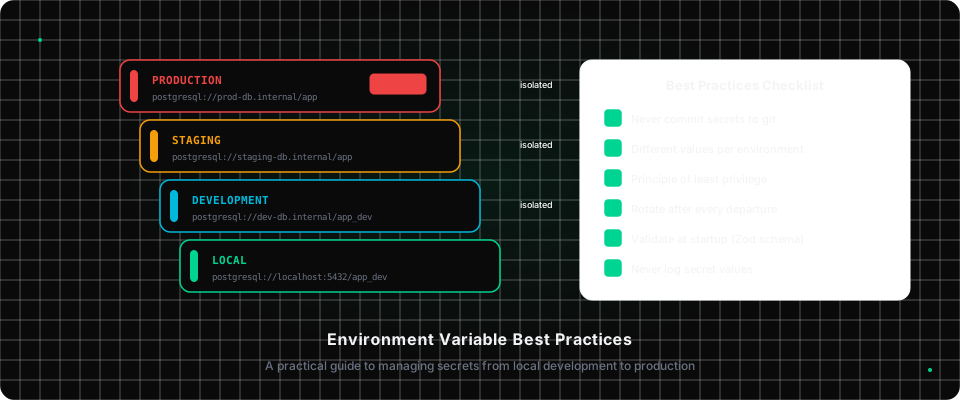
One of the most common mistakes is sharing the same secret across multiple environments. This seems convenient but eliminates isolation between your development and production systems.
LOCAL       → postgresql://localhost:5432/myapp_dev
DEVELOPMENT → postgresql://dev-db.internal/myapp_dev
STAGING     → postgresql://staging-db.internal/myapp_staging
PRODUCTION  → postgresql://prod-db.internal/myapp (RDS Multi-AZ, encrypted)
The benefits are significant:
- A bug in your development code cannot corrupt production data
- Secrets can be rotated per environment independently
- When a developer's machine is compromised, they have local credentials only
- You can give contractors dev credentials without exposing staging or production
Your secret management tool should enforce this structure. If you have to manually ensure the right credentials are in each environment, you will eventually make a mistake.
3. Apply the Principle of Least Privilege
Every secret should grant the minimum access needed for its purpose.
For database credentials:
-- Don't create a single superuser for your application
-- Create scoped users instead:

-- Read-only user for analytics/reporting services
CREATE USER reporting_user WITH PASSWORD 'secret';
GRANT SELECT ON ALL TABLES IN SCHEMA public TO reporting_user;

-- Application user with specific table permissions
CREATE USER api_user WITH PASSWORD 'secret';
GRANT SELECT, INSERT, UPDATE ON users, orders TO api_user;
GRANT SELECT ON products TO api_user;
For cloud credentials (AWS):
- Never use root credentials or
AdministratorAccessin application code - Create IAM roles with specific, minimal policies
- Use
sts:AssumeRolewith temporary credentials when possible - Enable MFA Delete on S3 buckets containing sensitive data
For API keys:
- Use scoped keys where the provider supports it. Stripe has restricted keys, GitHub has fine-grained personal access tokens
- Create separate keys per environment. Never use your production Stripe key in development
- Store only what you need; if you only need to read, get a read-only key
4. Rotate Secrets Regularly, and After Every Departure
Secret rotation is uncomfortable because it requires coordinating changes across your team and infrastructure. This discomfort is exactly why it rarely gets done, and why breaches often go undetected for months.
Establish a rotation schedule:
- Database passwords: every 90 days
- API keys for external services: every 90–180 days
- Internal service tokens: every 30–90 days
- OAuth client secrets: every 180 days
Automate where possible. AWS RDS, Azure SQL, and Google Cloud SQL all support automated password rotation. Secrets manager integrations can handle rotation without downtime.
Rotate immediately when:
- A team member with access to the secret leaves
- You suspect a secret may have been exposed
- A service you use reports a breach
- A device with local credentials is lost or stolen
When someone leaves your organisation, do not just remove their account. Audit which secrets they had access to and rotate them. This process is painful without proper tooling, which is one of the strongest arguments for using a secret manager that tracks access history.
5. Audit Who Has Access to What
If you cannot answer "who currently has access to our production database password?", you have an access control problem.
A secret management platform solves this by maintaining a record of:
- Which users have been granted access to which secrets
- When each secret was last accessed or modified
- Every create, update, and delete operation with a timestamp and user
This audit trail is also increasingly required for compliance. SOC 2, ISO 27001, GDPR, and HIPAA all have provisions around access control and data access logging. If you are planning to pursue any of these certifications, proper secret management is a prerequisite, not an afterthought.
6. Validate Environment Variables at Startup
Do not discover a missing environment variable when your application crashes in production at 3am. Add startup validation using a schema:
// lib/env.ts
import { z } from "zod";

const envSchema = z.object({
  DATABASE_URL: z.string().url(),
  STRIPE_SECRET_KEY: z.string().startsWith("sk_"),
  CLERK_SECRET_KEY: z.string().min(1),
  NODE_ENV: z
    .enum(["development", "staging", "production"])
    .default("development"),
});

export const env = envSchema.parse(process.env);
Now any startup with a missing or malformed environment variable fails immediately with a clear error instead of a cryptic runtime exception three requests later.
This pattern, popularised by t3-env and @t3-oss/env-nextjs, is becoming standard in TypeScript applications. It costs almost nothing to add and eliminates an entire class of production incidents.
7. Never Log Secret Values
Your application should never log environment variable values. This is easier to accidentally violate than it sounds:
// Obviously bad
console.log("Connecting with", process.env.DATABASE_URL);

// Less obviously bad: object spread can include sensitive values
console.log("Config:", { ...config, db: process.env.DATABASE_URL });

// Subtle: some error reporters capture local variable context
try {
  await db.connect(process.env.DATABASE_URL);
} catch (e) {
  // Sentry may capture DATABASE_URL as part of the local scope
  Sentry.captureException(e);
}
Use a structured logger that explicitly controls what gets recorded. If you use Sentry or a similar error reporter, configure scrubbing rules for patterns that look like secrets (anything matching _KEY, _SECRET, _PASSWORD, _TOKEN).
8. Document What Each Variable Does
A .env.example file is not optional. It is part of your project's documentation:
# .env.example

# PostgreSQL connection string
# Local: postgresql://localhost:5432/myapp_dev
DATABASE_URL=

# Stripe API key (use sk_test_* for local and development)
STRIPE_SECRET_KEY=

# Clerk authentication
# Get from https://dashboard.clerk.com → API Keys
CLERK_SECRET_KEY=
NEXT_PUBLIC_CLERK_PUBLISHABLE_KEY=

# Google Cloud KMS key for secret encryption
# Format: projects/{project}/locations/{location}/keyRings/{ring}/cryptoKeys/{key}
KMS_KEY_NAME=
This file lives in version control. Every variable has a comment explaining what it does, where to get the value, and any format constraints. New developers should be able to read this file and understand the full configuration surface of the application.
Putting It Together
Good secret management is not a single tool or a single practice. It is a system:
- Prevent secrets from reaching places they should not: git hooks,
.gitignore - Store them in an encrypted, access-controlled system, not Slack, not Notion
- Scope access to what each person and service actually needs
- Rotate on schedule and after every departure
- Audit who has what and when they accessed it
- Validate at startup so missing secrets surface immediately
- Never log secret values
Each of these is a small, contained investment. Together they dramatically reduce your attack surface and make the inevitable "we need to rotate everything" event manageable rather than catastrophic.
The teams that get this right are not the ones with the most sophisticated tooling. They are the ones that made these practices boring and automatic early on.