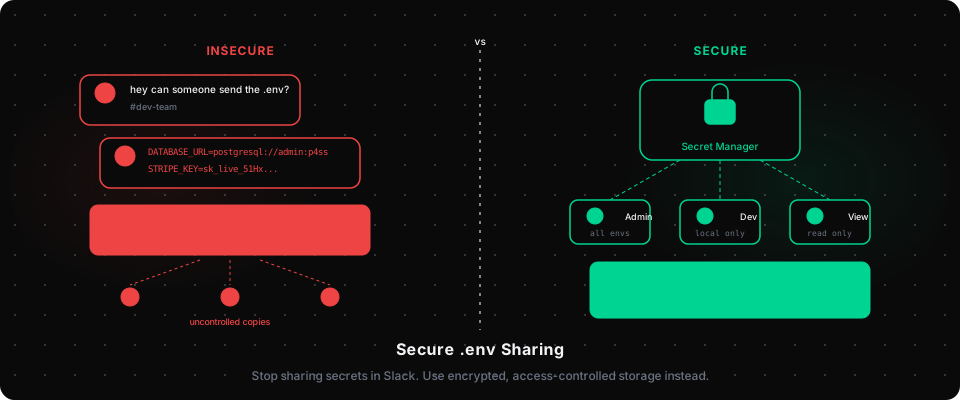
Every developer knows the drill. You join a new project, clone the repo, and see a .env.example file staring back at you. Then comes the Slack message: "hey, can someone send me the actual .env?"
That message is a security incident waiting to happen.
Why Sharing .env Files Over Slack Is a Problem
The .env file is where your application's most sensitive data lives: database passwords, API keys, OAuth secrets, payment provider credentials. These are the literal keys to your infrastructure.
When developers share these over Slack, email, or shared documents:
- The secret leaves a permanent trail. Slack message history persists indefinitely. Email attachments get forwarded. Anyone with access to those channels can read your production credentials.
- There is no audit trail. You have no idea who has a copy of what secret, or when it was last rotated.
- Revocation is nearly impossible. When a developer leaves, do you know which secrets they received in DMs? Rotating every key is the only safe option, and it is expensive.
- Accidents happen. Copy-paste errors, sending to the wrong person, posting in a public channel. It is not a question of if, but when.
A 2023 GitGuardian report found that 68% of developers have accidentally exposed secrets, including credentials, API keys, or tokens, at some point in their careers. The primary vectors are version control and direct sharing via messaging apps.
What Your .env File Actually Contains
Let's be concrete about what we're protecting:
# Database: full read/write access to production data
DATABASE_URL=postgresql://user:password@prod-db.company.com/myapp

# Payment processing: someone with this can charge customers
STRIPE_SECRET_KEY=sk_live_51Hx...

# Cloud storage: grants access to all your user files
AWS_ACCESS_KEY_ID=AKIAIOSFODNN7EXAMPLE
AWS_SECRET_ACCESS_KEY=wJalrXUtnFEMI/K7MDENG/bPxRfiCYEXAMPLEKEY

# Authentication: can create tokens on behalf of any user
CLERK_SECRET_KEY=sk_live_...
A single .env file shared in a Slack DM gives an attacker, or a disgruntled ex-employee, full access to your production system.
The Wrong Solutions Teams Try
Shared Google Doc or Notion page: The secret still has no access control, no audit log, and lives outside your security perimeter. When someone's Google account is compromised, so are all your secrets.
Password managers (1Password, Bitwarden): Better than Slack, but these tools are not built for developer workflows. There is no per-environment management, no CLI integration, and no way to track which developer accessed which secret when.
Committing a .env file to a private repo: This is the worst option. Even if the repo is private today, it might not be tomorrow. Git history is permanent. Even after you delete the file, the secret remains in git log.
The Right Approach: A Dedicated Secret Manager
The correct solution is to store secrets in a dedicated system that:
- Encrypts secrets at rest, so no one, including the vendor, can read your plaintext values
- Controls access per role: developers get dev credentials, only ops gets production
- Maintains an audit log: every access, change, and deletion is recorded
- Supports instant revocation: remove a team member and they immediately lose access
- Organises by environment: LOCAL, DEVELOPMENT, STAGING, and PRODUCTION are separate namespaces
Tools like AWS Secrets Manager and HashiCorp Vault solve this at the infrastructure level. For development teams that need something simpler, without the ops overhead of Vault, purpose-built tools like Keyrua focus specifically on the team collaboration use case.
A Practical Migration Path
If you are currently sharing secrets in Slack, here is how to move to a proper solution:
Step 1: Audit your current secrets. List every service your application connects to and every credential it uses. This is your rotation checklist.
Step 2: Rotate everything. Before migrating, rotate all secrets. Assume your previous sharing method was compromised. This is the clean break you need.
Step 3: Set up your secret manager. Import your rotated secrets organised by environment. Configure access control: who needs what.
Step 4: Update your onboarding docs. New developers should never need to ask for credentials via Slack again. Access is granted through the platform.
Step 5: Add pre-commit hooks. Use tools like git-secrets or trufflehog to prevent accidental commits of secrets to your repository:
# Scan your repo for exposed secrets
trufflehog git file://. --since-commit HEAD --only-verified
The Onboarding Dividend
There is a surprising side effect of doing this correctly: onboarding becomes dramatically faster.
Instead of spending a developer's first day hunting for credentials across Slack history and asking colleagues, they get access to the secret manager and everything they need is immediately available, scoped to exactly what they should have.
Teams that make this switch report onboarding time dropping from a full day to under 30 minutes. The security improvement is table stakes; the productivity gain is the part that surprises people.
Summary
Sharing .env files over Slack or email is not just a bad habit. It is a liability. Every shared credential is an uncontrolled copy of your production access with no expiry, no audit trail, and no revocation mechanism.
The fix is straightforward: use a dedicated secret management tool that encrypts at rest, controls access by role, and maintains a complete audit trail.
Your future self, and your next security audit, will thank you.