
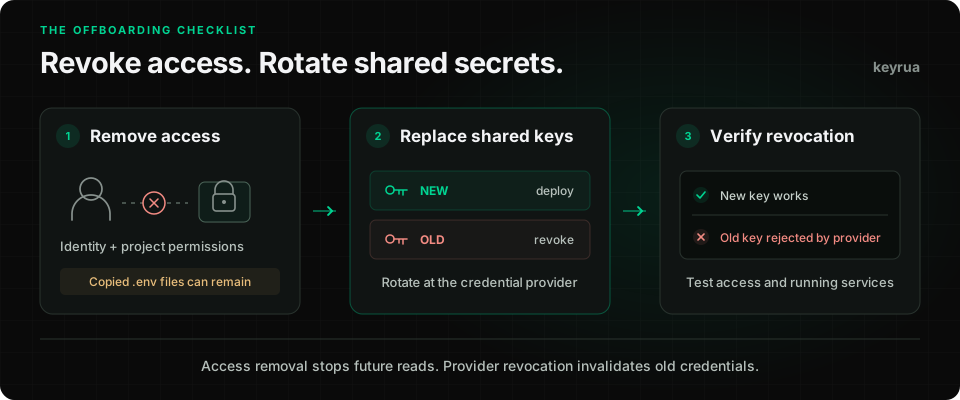
A developer leaves your team on Friday. You remove their GitHub membership, disable their work account, and take them out of your secret manager. On Monday, the database password in their local .env file still works.
Nothing in that sequence changed the password at the database.
Developer offboarding has two separate jobs: stop the person from retrieving credentials, and stop previously retrieved credentials from granting access. This guide gives small engineering teams a checklist for both, including a practical workflow for Keyrua.
1. Give the cutoff an owner and a time
Create one offboarding ticket with an accountable engineer, a cutoff time, and an owner for each affected system. Coordinate with whoever manages the departure. A handover can happen before the cutoff; the access removal should happen at the agreed time.
Before then, transfer ownership of repositories, deployments, billing contacts, scheduled jobs, and service accounts. Confirm that a remaining administrator can manage each critical service. A deployment that depends on a departing developer's personal token needs a replacement identity.
For a planned departure, prepare the credential inventory and replacement deployments in advance. If there is evidence of compromise, follow your incident response process and prioritize containment. Keeping a known compromised key active for a comfortable rollout leaves the exposure open.
Record decisions and evidence in the ticket. Keep credential values in the secret manager.
2. Remove every route back in
Start with the identity provider, then check each system directly. Single sign-on covers only the accounts and applications configured to use it. Local accounts, personal tokens, and separately managed memberships need their own review.
| Access surface | Action at cutoff | Evidence to retain |
|---|---|---|
| Work identity and SaaS accounts | Disable access; revoke sessions and refresh tokens where supported | Account status and revocation time |
| Source control | Remove organization, team, direct repository, and collaborator access as applicable | Membership and permission review |
| Cloud and deployment platforms | Remove personal IAM grants, console access, and deployment permissions | Effective permissions after removal |
| Secret manager | Remove organization membership or the relevant project assignments | Membership change and authorization check |
| VPN, SSH, and databases | Revoke personal certificates, authorized keys, and database roles | Revocation or role-disable result |
| Automation and integrations | Review personal access tokens, OAuth grants, deploy keys, and service accounts | Replacement owner and credential status |
Check inherited access as well as direct grants. Removing a project assignment will not help if an organization administrator role still grants access to that project.
Source removal also has a limit: GitHub documents that former members may retain local repository copies. Repository permissions control future access to GitHub; they cannot erase an existing clone. Handle local files and company devices through your normal departure process, and rotate credentials that those copies could contain.
3. Inventory credentials the person could retrieve
Use their effective access during the engagement to define the review scope. Include every relevant project and environment, plus credentials available through CI settings, cloud consoles, shared documents, or earlier .env exports.
Start with a table like this. These are illustrative identifiers, with no credential values:
| Credential | Consumers | Required action | Owner |
|---|---|---|---|
| Personal database login | Developer workstation | Disable login; terminate existing sessions if required | Database owner |
| Shared production database password | API servers, workers, migration jobs | Replace and migrate every consumer | Backend owner |
| Payment API key | Checkout API, billing worker | Issue replacement; migrate; expire old key | Payments owner |
| Deployment token | CI workflow, release script | Replace personal token with an approved automation identity | Platform owner |
| Webhook signing secret | Webhook receiver | Use the provider's signing-secret rotation procedure | Integration owner |
Add the provider's credential ID, environment, deadline, and verification result to your actual ticket. Never paste the secret itself.
For personal credentials, revoke the departing person's credential. For shared credentials they could retrieve, plan replacement with the owners of the consuming services. Prioritize production access, administrative permissions, customer data, and spending authority. Track lower-risk environments too: a development credential can still grant access to a paid service or shared dataset.
An empty read log does not establish that a secret was never copied. Your tool may not record reads, its retention may be incomplete, or the value may have arrived through another channel. Document uncertainty and assign a follow-up owner.
4. Rotate at the issuing service, then update consumers
Changing a value in your secret manager changes the stored configuration. The old credential stops working only when the system that accepts it revokes, expires, or replaces it.
OWASP treats rotation, revocation, and expiration as separate stages of the secret lifecycle. Your offboarding checklist should track each applicable action.
For a planned rotation where the provider supports overlapping credentials:
- Create a replacement at the provider. Give it the permissions and restrictions the application needs. Record its identifier.
- Store it in the correct project and environment. Ensure the departing person can no longer retrieve the replacement.
- Update every consumer. Include API servers, workers, scheduled jobs, migration tools, CI settings, and deployment configuration.
- Deploy or restart as required. A process that loaded credentials at startup needs a new process or an explicitly implemented reload mechanism.
- Verify the application uses the replacement. Check the affected operation, authentication errors, and provider usage records where available.
- Revoke the old credential at the provider. Confirm that it is no longer accepted.
For example, Stripe supports rotating a key with a scheduled expiration for the old key. Use a deliberate migration window and record when the old key actually expires. A replacement key existing in the dashboard does not finish the job.
If the provider supports only one active credential, plan a coordinated cutover with the service owner. The overlapping sequence cannot promise uninterrupted service in that case. Database logins, API keys, webhook signing secrets, and encryption keys also have different rotation semantics; use the procedure for the actual credential type.
Before revocation, define a recovery path for a failed deployment. After revocation, recovery must use a valid replacement credential. Do not restore an exposed key to make an old release work.
5. Apply the access changes in Keyrua
Keyrua organizes configuration by project and environment. Its current access model distinguishes organization administrators from explicitly assigned project members:
- Organization administrators inherit access to every project in the organization.
- Other accepted organization members need an explicit project assignment.
- Project Editors can manage secrets and view activity. Project Admins can also manage project members, settings, and deletion.
- A project assignment covers all of that project's environments. It is not a separate permission grant for each environment.
For someone leaving the organization, remove their organization membership. For someone leaving one project while remaining on the team, remove their assignment in Project members and check whether an organization administrator role still grants inherited access. Manage inherited administrator access at the organization level. Changing a project Admin to Editor still leaves secret access.
Keyrua checks organization membership and project authorization on protected project requests, including requests made through the CLI. Verify the result after the change. Access removal does not erase exported files, remove credentials from an already running process, or revoke keys at an external provider.
After removing access, replace the affected provider credentials and update their values in Keyrua. Existing authorized team members can start a fresh process with the updated configuration. For example, with the CLI installed and authenticated, the correct organization selected, and my-app replaced by your project slug:
keyrua run --project my-app --env development -- node server.js
keyrua run fetches configuration when it starts the child process. It does not refresh the environment of a process that is already running. Production deployments need their own configured update and restart procedure.
You can also review secret changes for a project and environment:
keyrua logs --project my-app --env production
These records show secret creation, updates, and deletion. They do not include secret reads or previous values, and they do not prove that a provider rejected the old credential. Keep provider revocation evidence in the offboarding ticket. Preserve any required records before deleting a project, because project deletion also deletes its associated logs.
The security and access model describes these boundaries in more detail.
6. Verify denial as well as application health
A successful deployment shows that one path works. Closing an offboarding ticket also requires evidence that the removed access no longer works.
Use an approved test account to rehearse the membership-removal path in a test project. For the actual departure, review effective memberships, session and token status, and authorization evidence available to administrators. Do not ask for the former employee's password or copy their token to perform a check.
For each replaced shared credential, confirm revocation through the provider's credential status and, where appropriate, a controlled request to a harmless authenticated endpoint. Record the credential ID, time, and result without recording its value. Confirm that a failure is an authentication rejection rather than a network error.
Then check the consumers that are easy to miss: a queue worker, a nightly task, a migration job, or a service scaled to zero during the rollout. An API health endpoint may never exercise their credentials. Review provider activity after cutoff and investigate unexpected use of old credentials where that visibility is available.
A checklist you can reuse
Copy this into your next offboarding ticket and assign an owner to each item:
Departure / project change:
Access cutoff time:
Accountable engineer:
Systems and credential owners:

[ ] Transfer ownership of services, automation, and recovery access.
[ ] Disable the work identity and review local application accounts.
[ ] Revoke applicable sessions, tokens, keys, and personal IAM grants.
[ ] Remove organization/project access, including inherited grants.
[ ] Inventory shared credentials available across relevant environments.
[ ] Issue replacements at providers and update authorized consumers.
[ ] Restart/redeploy consumers and verify affected operations.
[ ] Revoke old provider credentials and record evidence of rejection.
[ ] Review delayed jobs and provider activity after cutoff.
[ ] Complete device/file handling and assign any remaining follow-ups.
Before the next departure, reduce the inventory: give people individual accounts where supported, separate development and production credentials, and grant project access deliberately. Keep the consumer list current when adding an integration. The team secret-sharing guide and CI/CD secret management guide cover those everyday workflows.
Close the ticket when access removal, credential revocation, and application checks have evidence behind them. A removed member and a revoked API key are two separate results to verify.