
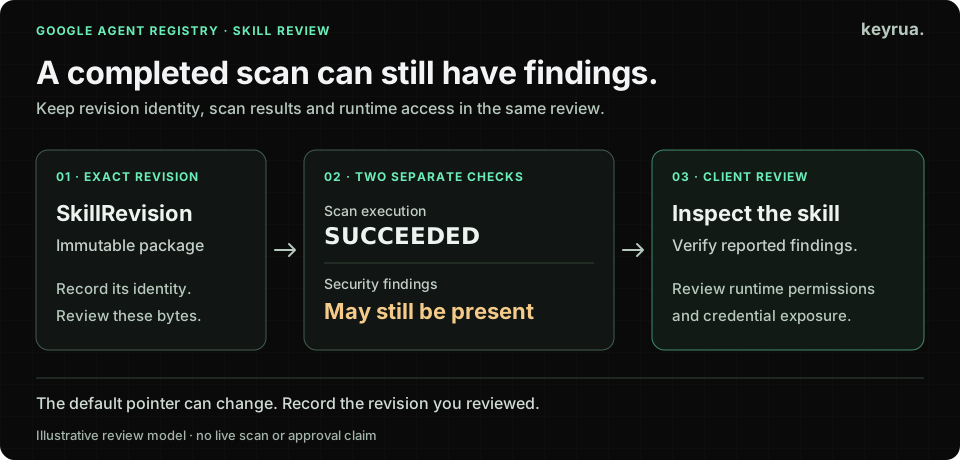
An agent skill can have a scan status of SUCCEEDED and still have security findings. In Google Agent Registry, that status tells you the scanner finished running. Read the findings before approving the skill for client work.
For a software agency, the consequence is practical. One engineer packages a useful deployment routine. Another reuses it on a second client. A shared template makes it available to the rest of the team. The review needs to follow the actual revision being used, together with the credentials and tools each execution can reach.
Google’s November 6 release notes announce general availability for standalone skills, including immutable skill revisions. The same update makes skill scanning and governance available; skill payload encryption with customer-managed keys is explicitly Preview. Sources in this article were reviewed on November 8, 2026.
The useful response is a small release process for reusable agent instructions: identify the package, inspect its result, and decide where it can run.
Read the result attached to the exact revision
Consider this synthetic metadata example, using the fields documented in Google’s scan results guide:
scanResult:
  scanState: SUCCEEDED
  findings:
    - projects/example-client/locations/global/findings/example-finding
The nonempty array is the next thing to investigate. A check that only compares scanState with SUCCEEDED would miss it.
Keep two decisions visible in your own review record. First, did analysis finish on the revision being considered? Second, what did it report, and what did the reviewer verify? Do not compress both into a single green badge called “scanned.”
An authorized operator can inspect the revision with the documented read command:
gcloud agent-registry skills revisions describe REVIEWED_REVISION_ID \
  --skill=private-client-deploy \
  --project=CLIENT_GOVERNANCE_PROJECT \
  --location=REGISTRY_LOCATION
Replace the uppercase placeholders and illustrative skill ID with the intended resources. Keep the result in the client’s restricted review record. This is an inspection command, not an upload, promotion or execution command; no Google Cloud project was accessed for this article.
If the result is pending, failed, disabled or unsupported, record that state explicitly. An unavailable result should not quietly become an approval because a pipeline expects a boolean.
Resolve the package before reviewing its permissions
Google’s skills architecture separates the skill container from its immutable revisions. The container has a defaultRevision pointer. A consumer that requests the skill without an explicit revision can receive the revision selected by that pointer.
That distinction creates a handoff problem. “We reviewed the deployment skill last month” is incomplete evidence if the default now points elsewhere.
Record the full revision identity that was reviewed. Where the consumer supports selecting a revision, make that selection explicit. Where it resolves the default, capture the resolved revision in the execution record and make default changes part of the release review. An artifact checksum can help compare downloaded copies, but it must be tied to the reviewed source and retrieval process.
Use a record that the next engineer can actually follow:
| Review field | Useful evidence |
|---|---|
| Client and owner | Client workspace, responsible engineer and approval record |
| Package identity | Full skill revision resource name and source change |
| Analysis | Scan state, finding references and review date |
| Findings decision | Verified behavior, required fixes and any approved exception |
| Execution context | Runner identity, available tools, filesystem mounts and credentials |
| Release evidence | Selected revision, consumer rollout and a harmless test result |
These are proposed agency review fields, rather than a new Agent Registry resource schema. Store references to credential records; never paste credential values into this table.
Check what the configured policy actually blocks
Agent Registry’s default scanning mode is ENABLED_BLOCKING. Its policy enforcement table distinguishes downloading an archive from promoting a default revision. Findings block archive downloads; findings or pending scans prevent default promotion. Nonblocking mode permits those operations with warnings, while disabled mode bypasses scanning.
Read the actual policy before describing a client’s workflow as enforced. A successful upload under an audit configuration is different evidence from a promotion that passed blocking checks.
Google also documents a migration constraint in Manage skills: switching to blocking mode can fail when the current default has findings or unresolved scan results. Plan that change around a reviewed default revision instead of treating the policy toggle as an immediate cleanup operation.
For your own release gate, require the intended revision, a completed analysis result and an explicit findings decision. Then apply the client’s approval policy. That application-level review is a recommendation; it should not be confused with the registry’s exact download rules.
Inventory revisions created before scanning was enabled
Enabling scanning does not trigger scans of existing revisions. Google’s configuration guide says content uploaded while scanning was disabled must be submitted as a new revision to be scanned.
This deserves its own rollout task. List the existing skills, identify which revisions client workflows consume, and record the evidence available for each one. Include copies bundled in agent images or repository templates, not only packages retrieved directly from the registry today.
For older unscanned content, create and review a new revision through the authorized release process. Then update the intended consumers and verify which revision they load. Keep the source change and rollout evidence together so that a future maintainer can distinguish “scanning enabled” from “this client’s deployed copy was reviewed.”
Do not assume that changing a registry setting removes a downloaded archive or replaces instructions already loaded into a running process. Verify the behavior of the actual consumer. Our resumable agent guide covers the related problem of checking authority when work resumes.
Review the skill and its runtime together
A deployment helper might legitimately inspect build configuration. That does not establish a need for every credential on an engineer’s machine, or access to every client account the engineer administers.
Start the review with the task: which operation should this skill perform for this client? Follow its scripts, referenced files and requested tools from that task. Check outbound destinations, subprocesses, expected outputs and any instruction that asks the agent to collect more context. Review the difference when the package changes; a familiar display name is weak evidence about new contents.
Google states that its scanner uses LLM analysis and can produce false positives, false negatives and inaccurate finding details. Verify the relevant file and behavior before changing it. An empty findings list still leaves the agency responsible for deciding whether the task and available access are appropriate.
Test the reviewed revision in an isolated client test context with synthetic values. Check the outputs and attempted operations against the task. Keep production credentials out of that exercise. If a broad parent environment or mounted configuration directory supplies unrelated access, narrow the runner before approving the workflow.
The important boundary is the authority available during execution. An instruction package can be useful and correctly versioned while still running with more access than its job requires. Our AI agent secrets guide explains the credential side of that boundary.
Keep the configuration handoff explicit
Keyrua gives a team a shared place to maintain configuration by project and environment. The CLI can fetch that configuration before starting a command. This helps the agency keep track of the values a reviewed client workflow is intended to consume.
The child process receives the actual fetched values, and the current CLI also inherits other variables from its parent environment. Use a deliberately limited runner; injection alone does not isolate a skill from secrets. Updating a stored value also does not refresh an already running child process. These details are part of the security model and the consumer handoff.
Keep skill approval and runtime credential management as separate recorded decisions. Keyrua does not scan Agent Registry packages, enforce their promotion policy or revoke credentials at their issuing providers.
For the first rollout, choose one reusable skill and one client test workflow. Close the review with the resolved revision, inspected findings, approved runtime access and observed test result. That gives the next client project something concrete to reuse.