
An existing cron route can stop receiving the request method it expects during a Vercel Schedules migration. The new path target defaults to POST; legacy Cron Jobs use GET. Keeping the old handler requires an explicit requestMethod: "GET".
That small difference in Vercel’s migration guide is a useful place to start a larger review. A scheduled job has a caller, an execution environment and credentials for the systems it changes. Moving the timer does not verify all three.
Vercel announced Schedules in public beta on November 5, 2026, with support for production, Preview branches and custom environments. Existing Cron Jobs continue working. For an agency managing client reports, synchronization or maintenance, this creates a practical opportunity to review background work before extending it into more environments.
The example below is a proposed migration review, not a reported incident or a test of a customer deployment. Sources were reviewed on November 6, 2026. Schedules remains a beta; check current documentation when implementing it.
Preserve the route contract during migration
For an existing hourly report route, a configuration might look like this:
{
  "schedules": {
    "hourly-report": {
      "schedule": "0 * * * *",
      "path": "/api/hourly-report",
      "requestMethod": "GET"
    }
  }
}
This is a configuration illustration. It does not implement the route, authenticate a request or make the report safe to run.
At cutover, remove the corresponding legacy crons entry in the same change. Vercel warns that retaining both declarations invokes the route twice for each occurrence. Preserve the intended timezone as well: both features default to UTC, while Schedules allows a named timezone.
Review the migration against the deployed handler, rather than the filename alone. Record its accepted method, authentication check and expected business result. A successful deployment tells you the configuration built; evidence that the intended client received one test report answers a different question.
Use a synthetic recipient and test data for that validation. Keep a record of the job’s identity and result, without copying its credential values into the handoff.
Choose how the scheduler is allowed to call the job
Vercel distinguishes path targets, private function targets and queue targets. Its handler documentation explains the invocation boundary:
- A path remains a public route. Set
CRON_SECRETand check the bearer credential in the route. - A private function target requires the
schedule/v1betatrigger. It has no public URL and is invoked by Vercel’s scheduler. - A queue target sends work to a consumer and supports delivery retries. Dynamic schedules target queue topics.
The handleSchedule wrapper parses run metadata; it does not check CRON_SECRET for a public path. Adding the wrapper alone is not a conversion to a private function. When using a private function, follow the documented build-output identifier and trigger configuration rather than copying a source filename into the target.
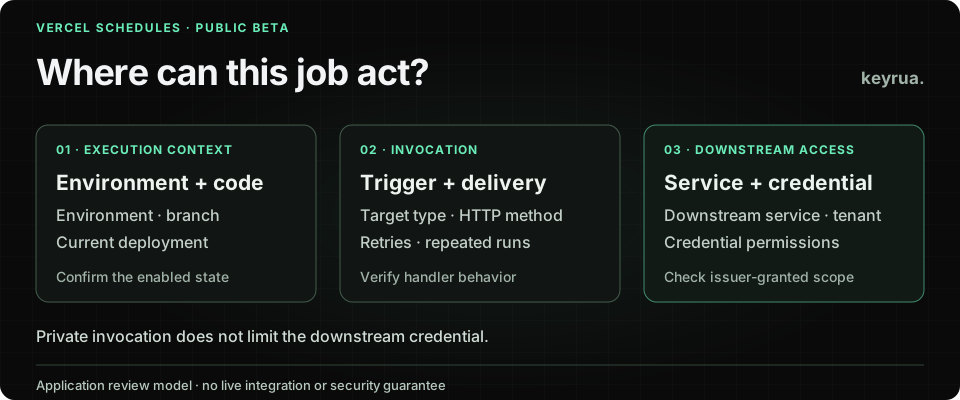
The architectural decision is which callers should reach the task. A private trigger can narrow that entry point. The application’s database role, email credential or CRM token still determines what the task can do after invocation.
For example, a report function authorized to send client email needs a deliberate test destination. Making its trigger private does not turn its email provider account into a sandbox account. That is an application configuration decision, independent of who started the run.
Review the branch, the current deployment and the downstream account
According to the Schedules concepts guide, dispatch follows the current deployment of the environment or branch, not necessarily the deployment that originally declared the schedule. Promotions and rollbacks can therefore change the code and static declarations in use.
New static production schedules start active. New static Preview schedules start inactive; custom environments default to inactive unless configured otherwise. A static schedule retains an explicit enabled or disabled state across subsequent deployments.
Keep these details in the release review. Do not assume a new Preview deployment is automatically running its jobs, or that another push clears an earlier decision to enable them.
Vercel’s management guide adds another distinction: dynamic schedules become active immediately in every environment. The SDK uses the running deployment’s environment or branch, whereas the management CLI targets production by default. Select the intended branch or environment explicitly when operating it.
Before enabling a client’s Preview job, complete a record such as this:
| Review item | Synthetic example | Evidence to keep |
|---|---|---|
| Execution location | Preview branch report-layout-test | Intended branch and current deployment identifier |
| Intended action | Generate a fixture report | Handler version and allowed test operation |
| Downstream service | A test email account and fixture database | Provider account identifiers and credential references |
| Client authority | Only the agreed test client | Application authorization decision and owner |
| Test window | A short, supervised validation | Activation decision and completion result |
Environment names make this record understandable. Provider-side permissions make the credential’s authority enforceable. Inspect both. An application can be deployed as Preview while its configured connection string still points at a live client database; this is a configuration scenario to prevent, not a vulnerability alleged in the beta.
Make a run safe to repeat without confusing identity and permission
A scheduler’s execution identifier identifies an occurrence. It does not establish which client the application may act for.
Vercel documents that duplicate delivery remains possible. Function and path failures are not retried by the scheduler; queue delivery has its own retry behavior. Choose the target with that failure model in mind, and design the business operation to tolerate repetition.
For a daily report, an application might maintain a durable record keyed by its authorized client, report type and reporting period. A repeated attempt can then consult the result already recorded. This is a design example: the transaction, concurrent attempts and ambiguous email-provider outcome need a concrete implementation. A pre-send “already sent?” query alone can race.
Keep transport deduplication and business deduplication separate. Repeating an occurrence and manually starting another run can be different events that would produce the same client-facing report. Define what counts as the same business action before choosing its key.
Also check current client authorization when the work executes. A payload containing a client identifier is an instruction to validate, not a grant. The handler should resolve the permitted integration and operation through the application’s access model before selecting credentials.
Our CI/CD secret management guide covers the credential supply side. A scheduled consumer needs the same scrutiny as an interactive request, even when nobody is watching the terminal.
Verify the stop procedure alongside the first successful run
The management documentation distinguishes stopping future occurrences from stopping delivered work. Deleting a schedule skips pending, undelivered runs; it does not cancel a run already delivered to its target. Inactive schedules can also be invoked manually.
Write a stop procedure that names the schedule, branch or environment, active worker and downstream owner. Confirm whether a consumer is still working before declaring the client job stopped. If it has already submitted a provider operation, use that provider’s documented status and cancellation controls where available.
For a migration rehearsal, collect four results: the intended handler accepted the intended request, only the permitted test resources changed, repetition behaved as designed, and the stop procedure handled outstanding work. A failed check should have a named owner before production activation.
This is a proposed acceptance exercise. No authenticated deployment, provider operation or live cancellation was performed for this article.
Keep approved configuration usable for the next engineer
An agency’s handoff should let another engineer identify the correct client configuration without searching old chat messages. Keyrua organizes shared values by project and environment and lets authorized team members retrieve them through the app, API or CLI. Its documentation describes the workflow.
Keep the access model in view: project assignments span every environment in that project, and organization administrators inherit access. An environment label is not an environment-specific membership restriction. The security model explains those boundaries.
For local rehearsal, keyrua run fetches configuration before launching the child process. That process receives real values; it does not refresh automatically when stored values change. Fetching approved configuration is separate from deploying it to Vercel or verifying which values a hosted job receives.
Keyrua does not configure Vercel Schedules, revoke credentials at their issuing services or cancel provider work. Use it for the maintained configuration handoff, then verify the deployment and the job’s actual authority through your release process.
Before enabling the schedule, leave the next engineer a specific answer: which client, which deployment, which service account, which permitted action and which evidence shows the job stopped when asked.