
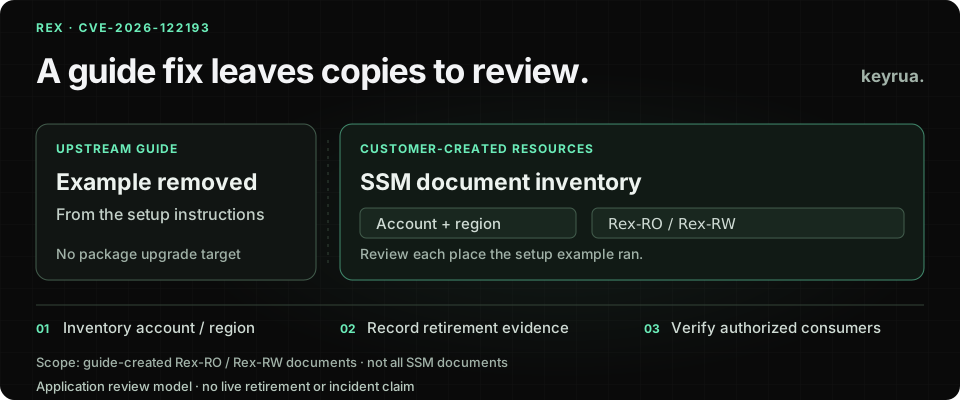
A dependency update does not remove an SSM document that a setup script created in a client’s AWS account. That is the operational problem behind CVE-2026-122193, disclosed by AWS on November 6, 2026.
The affected example belongs to the setup guide for Trusted Remote Execution, or REX. AWS says the example created Rex-RO and Rex-RW Systems Manager documents with unsafe handling of caller input. An authorized document invoker could use crafted input to run operating-system commands outside the intended REX sandbox. The scriptArgs parameter has the same class of issue. See the AWS security bulletin.
The bulletin concerns infrastructure created from documentation, rather than a shipped REX package release. AWS removed the example and recommends deleting the documents created from it in every account and Region where it was used. It lists no workaround.
For an agency, the first useful question is therefore concrete: which client accounts still contain the infrastructure that an engineer created while following that guide?
Read the remediation beyond the package fields
The maintainer advisory contains an easy source of confusion: its affected and patched version fields both show 0.1.0. Its explanatory text is explicit that there is no code patch to apply and that the issue is in the setup example.
Do not turn that metadata into an upgrade recommendation. Follow the described affected resource and the vendor’s removal guidance.
Sources were reviewed on November 7, 2026. AWS dates publication to November 6 at 09:00 PST, or 17:00 UTC. Neither primary advisory establishes exploitation in a particular customer account. The workflow below is a proposed review; no AWS account inspection or exploit test was performed for this article.
This distinction also changes what an agency can use as completion evidence. A dependency report might describe installed software. It cannot establish that a document created separately in another AWS account has been retired.
Start with the accounts and Regions where the guide ran
Build the inventory from client onboarding records, deployment repositories and the people who operated the setup. Include test accounts and temporary proofs of concept when the guide was used there. A production-only review can miss infrastructure that still has a permitted caller.
For an authorized operator, this read-only command is a starting point in one selected account and Region:
aws ssm list-documents \
  --profile client-audit \
  --region eu-west-1 \
  --filters Key=Owner,Values=Self \
  --query "DocumentIdentifiers[?Name=='Rex-RO' || Name=='Rex-RW'].[Name,DocumentVersion]" \
  --output table
client-audit and eu-west-1 are illustrative selections; use the authorized client profile and Region you intend to review. The CLI reference documents the ownership filter and result fields. Automatic pagination remains enabled. This command lists metadata; it does not invoke a document or delete it.
Treat the results as candidates. A matching name alone does not prove a document contains the affected example. Conversely, this query will not find renamed or adapted copies, and Owner=Self excludes documents owned elsewhere and shared into the account. Review provenance and relevant sharing arrangements as well as names.
The returned version field is not an inventory of every retained version. AWS provides ListDocumentVersions for that separate review. Record the document identity, versions and source comparison inside the client’s restricted operational record.
Repeat discovery across the agreed account/Region list. An empty result in one location is evidence about that query, not a statement about the whole client estate.
Trace the created resource back to its owner and callers
The original guide can disappear while a copied creation script remains in an onboarding repository. Retiring the cloud document without reviewing that source can leave a future setup run able to recreate it.
For each candidate, connect the deployed resource to the code or manual process that created it. Establish whether it came from the affected example, then give the remediation a named owner.
| Review surface | Evidence to collect | Owner to involve |
|---|---|---|
| Created document | Account, Region, document identity and relevant versions | Client platform administrator |
| Creation source | Setup history, copied script or infrastructure declaration | Repository maintainer |
| Invocation path | Permitted principals and the workflow using the document | IAM and automation owners |
| Instance targets | Managed nodes the workflow could reach | Workload owner |
| Operational dependency | Client task that must stop or move to a reviewed alternative | Service owner |
The advisory requires invocation permission; it does not describe an unauthenticated attack on every managed instance. AWS’s Systems Manager IAM documentation explains how actions, resources and conditions define authority. Review the actual policy and target relationship rather than relying on the RO label as a security guarantee.
Do not test a candidate by submitting a malicious parameter. The useful inventory evidence is its provenance, content and authorized invocation path. Any further security validation belongs in the client’s controlled process.
Retire the affected documents and prevent recreation
Coordinate the vendor-recommended deletion with the client’s authorized administrator and the owners of dependent automation. Remove or disable the copied creation path too. A repository comment saying the guide changed is weaker evidence than a reviewed change that prevents the old setup from being run again.
Document lifecycle details matter. AWS’s DeleteDocument reference says omitting a version deletes all versions. It also documents association and sharing conditions that can prevent deletion. Inspect those dependencies and the intended scope before acting; do not blindly delete every document with a matching name or retire only a default version and assume the resource is gone.
Keep the deletion result tied to its account, Region and identity. Then verify the resource state through an authorized read and record how the dependent workflow was handled. The acceptance question is whether the affected document remains available for use, and whether a normal provisioning run can create it again.
This is a remediation review model, not a new workaround for the vulnerable example. The primary advisories give removal guidance, not a replacement script that this article has tested.
Review credential exposure from evidence, not from the CVE label
Because the reported issue concerns commands outside the intended sandbox, the workload owner should establish what the managed-instance context could access. Relevant questions include its service identity, runtime configuration and the outputs retained by the automation.
The public advisory does not establish that credentials were stolen from your instance. Separate confirmed exposure, plausible access requiring investigation and resources ruled out by evidence. A document existing in an account is not itself proof of a successful malicious invocation.
If the client’s investigation identifies credentials requiring containment, act at their issuing services and verify affected consumers. Our credential recovery guide covers that issuer-and-consumer handoff. Replacing a value in a shared configuration store does not invalidate the old credential at its provider.
Keep raw document contents, command outputs and secret values out of public tickets. The shared status record can identify owners and evidence locations without becoming another copy of sensitive runtime data.
Make copied infrastructure part of the client handoff
The durable lesson is to record what a setup guide created, where it lives and who maintains it after onboarding. Include generated documents alongside deployed services and the approved configuration they consume. Our CI/CD secret management guide covers the consumer side of that inventory.
Keyrua helps a team maintain shared configuration by project and environment and retrieve approved values through the app, API or CLI. See the documentation and security model. Project assignments span every environment in a project, and organization administrators inherit access; environment names do not create separate membership restrictions.
The CLI fetches values before launching a child process. That process receives real values and does not refresh automatically after a stored value changes. A configuration update therefore still needs consumer verification through the release process.
Keyrua does not discover or delete SSM documents, patch REX, revoke provider credentials or determine whether an instance was compromised. Its role is the maintained configuration handoff after the responsible owners have made and verified their remediation decisions.
Close the review with a resource record: affected copies found or ruled out, account/Region coverage, retirement evidence, creation-source changes, dependent workflow owners and any credential action supported by the investigation. That record tells the next engineer what was actually fixed.