
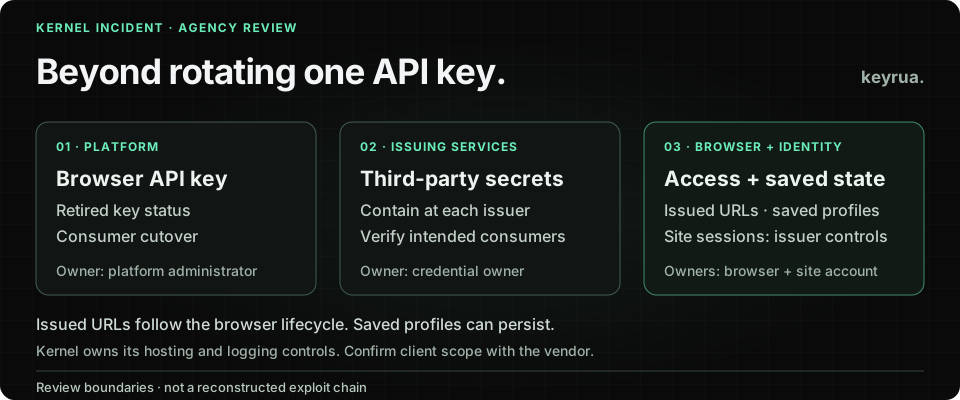
Kernel documents a detail that matters during a browser-agent access review: expiring or deleting an API key does not invalidate browser connection URLs that the key already obtained. Those URLs can still accept new connections until the browser is deleted.
That is documented product behavior, not a claim about an unreported exploit. It becomes particularly relevant after Kernel’s November 4, 2026 security incident notice, which describes compromised credentials and access involving logging and browser infrastructure.
For an agency building browser automation for clients, the practical question is broader than which variable receives a replacement key. Identify which running browser, saved state and client account could still provide access, then give each boundary an owner and a verification step.
This article uses primary sources reviewed on November 5, 2026. Incident statements below are attributed to Kernel. The review workflow is our recommendation; no customer incident investigation or live containment test was performed.
Separate the incident report from the product documentation
Kernel dates detection to November 2 and publication to November 4. Its notice reports this sequence:
| Event date | What Kernel reports |
|---|---|
| October 24 | A compromised Kernel API key was used to probe access |
| October 27 | Access to a logging provider and downloaded data containing some Kernel keys and application deployments’ third-party secrets |
| November 2 | Incident detection and response; the timeline records discovery and revocation of an API key |
| November 3 | A compromised hosting-account credential was used to access four GPU servers; three ran browser sessions |
Kernel says it revoked compromised credentials, removed logging-provider access, took affected servers offline and notified exposed organizations.
The public report does not establish that every customer was affected, that every profile or cookie was extracted, or how both compromised credentials were originally obtained. It is also insufficient to reconstruct every step between the named systems.
Use the vendor’s organization-specific notification to establish your client’s scope. The browser lifecycle documentation below explains review boundaries; it does not prove that an attacker exercised each one in this incident.
Retire a key and close the browser access it issued
The API key authenticates calls to the browser platform. A connection URL already issued for a browser is another access artifact. Treat a CDP, WebDriver or live-view URL as sensitive rather than placing it in a general support ticket.
Kernel’s API key guide distinguishes expiration, deletion and rotation. Rotation normally gives the old key a seven-day grace period; expire_in_days: 0 removes that overlap. Choose the behavior appropriate to an ordinary replacement or a compromise response with the account owner.
A replacement appearing in a secret store is therefore incomplete evidence. Establish the old key’s actual status and the disposition of browsers associated with the exposure window. Coordinate browser removal with the vendor’s response guidance and the client’s evidence-preservation process, because it ends active work.
Keep two verification results separate: whether the old key can authenticate an API request, and whether an already-issued browser connection can still be used. A failure at the first boundary does not answer the second.
Do this through an authorized account and a controlled validation plan. Never test a connection URL found in someone else’s logs, or post a live URL as proof of remediation.
A deleted browser can leave authenticated state behind
Kernel’s profile documentation explains that profiles retain cookies, authenticated sessions and other site data for future browsers. With save_changes: true, browser deletion or timeout saves that browser’s state back to its profile.
That makes teardown a state-management decision. Ending an individual browser and removing the state available to a later browser are separate operations. Before cleanup, establish which profile the browser used, whether it could save changes and which client identity that profile represented.
Consider a synthetic agency workflow: a browser signs in to a client portal, finishes an extraction task and is deleted. A later task loads the saved profile. The first browser’s termination is not evidence that the portal identity has been removed from the workflow.
The lesson is useful even outside an incident. Include the profile’s purpose and owner in the integration handoff, alongside its retention and access-removal procedure. A browser ID alone cannot describe the durable state the next task may load.
For an affected client, review saved-state handling with the account owner and vendor. Do not treat the mere existence of a profile as proof it was accessed or copied during the reported incident.
Close website sessions at the service that issued them
Kernel’s agent identity guide gives distinct effects for removing a stored credential, an authentication connection and a saved profile. Stopping a re-authentication mechanism does not itself clear saved cookies. Site-issued sessions require the site’s own expiry or revocation controls.
For an agency, that means the browser platform and the client application can have different administrators. The developer who replaces the automation API key may not be the person allowed to terminate the client account’s website sessions.
Arrange that handoff explicitly. Ask the client’s account owner to determine the affected identity and use the application’s documented controls. Record the action and the evidence available, rather than assuming that changing one password necessarily invalidates every session or token.
If a workflow uses automated re-authentication, include its owner in the review. Removing a saved profile while leaving the mechanism that can create a fresh authenticated one needs an explicit decision about whether the integration should remain authorized.
These are closure questions for potentially affected identities, not a recommendation to interrupt every client account that ever used a browser agent.
Give each exposure surface a named owner
A useful agency review record separates the systems you control from the vendor’s infrastructure:
| Surface to review | Responsible party and evidence to request |
|---|---|
| Kernel API key used by your workload | Authorized platform administrator: key identifier, scope, old-key status and consumer cutover |
| Issued browser connection URLs | Browser owner: affected browser IDs and confirmed disposition, with URLs kept out of shared reports |
| Saved profiles and re-authentication configuration | Integration owner: client identity, saved-state handling and future-launch decision |
| Third-party keys used by an application deployment | Credential owner at that issuing service: exposure decision, containment and consumer verification |
| Sessions already issued by a client website | Client account administrator: relevant account/session controls and verification evidence |
| Kernel’s hosting and logging infrastructure | Kernel: organization-specific findings and vendor remediation, rather than customer attempts to change vendor credentials |
This table is a recommended ownership model, not a list of confirmed artifacts stolen from your organization. Start from the vendor’s affected-organization notice and the integration inventory, then distinguish confirmed exposure, pending evidence and surfaces ruled out.
For logs and diagnostic exports under your control, identify who can read them and where copies were retained. Keep findings inside the authorized review system. Copying raw tokens or browser URLs into a new incident document creates another access surface without improving the ownership record.
Our credential recovery guide covers issuer and consumer coordination. This browser-specific review adds issued endpoints, durable profiles and website sessions to that handoff.
Make the next browser integration easier to contain
When the current review is complete, reduce the amount of unrelated client work that depends on one credential. Kernel documents organization and project boundaries: an organization-wide credential remains organization-wide even when a request targets a particular project.
Keep each client integration’s identity, credential references and browser-state owner explicit. Review the actual scope granted to the credential rather than relying on an environment label or a request header as an access restriction.
For a controlled staging exercise, use a test account and synthetic fixtures to evaluate separate closure conditions:
- Retired API credentials no longer authenticate.
- Browser connection artifacts are handled through the documented browser lifecycle.
- Future launches cannot reuse a profile that should have been removed.
- Re-authentication follows the integration’s current authorization decision.
- The issuing website’s session controls have the intended effect.
This is a proposed exercise. It is not a claim that we reproduced Kernel’s incident or verified these behaviors through an authenticated integration. Preserve the result for each boundary independently; one successful check cannot substitute for the rest.
Where Keyrua helps the agency handoff
Keyrua organizes shared configuration by project and environment and supplies values to authorized team members and API or CLI consumers. That gives a team a maintained place for approved configuration while ownership and response evidence live in its restricted operational records. See the documentation and security model.
The CLI fetches configuration before launching a child process. The child receives real values and does not refresh automatically when the stored configuration changes. Project assignments span every environment in a project, and organization administrators inherit access.
Keyrua does not revoke Kernel keys, close browser URLs, erase saved profiles or invalidate website sessions. After the issuing service contains an affected credential, update the configuration and verify the intended consumers through the team’s release process.
Close the client review with named evidence for the old credential, issued browser access, durable state and website identity. That record is more useful to the next engineer than a single checkbox saying “key rotated.”