
A leaked key can remain dangerous long after the commit containing it disappears.
In its October 23 report, LiteLLM says a master key was committed publicly on May 27, 2026. The commit was rewritten, but the key was never revoked. The vendor traces that credential to an October intrusion that ultimately led to publication of the malicious litellm==1.107.0 release on October 21. See LiteLLM’s attack-chain report.
For a software agency, the useful question is concrete: if a credential becomes exposed, who can revoke it, which client applications depend on it, and how will the team prove the replacement has reached every consumer?
Removing a file is easy to record in a ticket. Completing those three tasks takes coordination between developers, client owners, hosting providers, and whoever controls the issuing account.
This guide uses the vendor information available on October 26, 2026. It focuses on credential response and the operational lessons for agencies. Follow the linked incident guidance for subsequent changes and environment-specific recovery instructions.
What the new LiteLLM report adds
LiteLLM describes the leaked key opening access to an internal agent platform that held an unscoped GitHub organization-owner token. It says the attacker then used repository workflows to obtain additional maintainer credentials. Those identities became part of the release compromise.
The October 23 report replaces parts of the company’s earlier working explanation. This is the vendor’s account of the chain; it should not be expanded into claims that every deployment or every customer credential was compromised. See the canonical report.
The operational lesson is broader than the first key. An exposed credential may unlock a system that holds more credentials. A response needs to follow that access outward, rather than stopping after replacing the value that appeared in Git.
For an agency, that means looking beyond the affected repository. A shared integration account, build runner, registry token, or developer tool can connect applications that belong to different clients. Write down those connections while the project is healthy, so an incident does not begin with reconstructing them from messages.
If you used LiteLLM, establish exposure before running routine checks
The vendor names litellm==1.107.0 on PyPI and affected container artifacts distributed on October 21. Its incident notice includes image digests and the affected tags, including mutable aliases. Use that artifact and exposure guidance alongside your deployment records.
Do not start by running pip or Python inside a suspected affected environment. LiteLLM warns that Python startup can execute the malicious hooks again, including when pip starts. Review evidence from a clean environment and follow the vendor’s recovery procedure.
Package removal from a registry does not replace cached images or environments already created from them. LiteLLM recommends rebuilding affected environments and rotating credentials the host could reach; it says to assume exfiltration succeeded if the affected version was installed on a host with outbound internet. The absence of a marker file does not establish that the environment is clean. See the incident notice.
Use retained build manifests, image digests, lockfiles, deployment timestamps, and logs to identify what was installed or executed. Record the evidence and its limits. A tag’s current destination does not tell you which image an older deployment pulled.
Check current release guidance separately from recovery
At the time of this review, the official release page labels v1.106.4, released October 25, as Latest and provides image-signature verification instructions. Check the current release notes and your verification policy before rebuilding.
The initial incident notice’s temporary 1.106.2 recommendation predates resumed releases. Preserve that distinction when following older tutorials. A newer package version is a component choice for a rebuilt environment; installing it alone does not establish recovery of a compromised host.
Build an inventory of credentials and their consumers
Start with what the affected workload could access. Include environment variables, mounted credential files, database-held provider keys, and identities available through the hosting platform. Keep the inventory scoped to evidence and plausible access paths, and expand it as the investigation establishes more.
An inventory should identify credentials without copying their values into the incident record. For example:
| Credential reference | Issuing account | Known consumers | Revocation owner | Replacement evidence |
|---|---|---|---|---|
| Client A production model key | Client A provider project | API service and worker | Client’s account administrator | New key identifier and deployment records |
| Registry publishing token | Agency registry organization | Release job | Agency release owner | Old token revoked; replacement job tested |
| Client A database credential | Client A database service | API, worker, scheduled job | Database administrator | Updated connections and old credential rejected |
These are hypothetical entries, not a report about Keyrua customers.
The useful unit is the credential and its consumers. A replacement key can work in the web application while an infrequent job still holds the previous value. That job may only fail when the old key is revoked, long after the first smoke check passed.
Give each credential a named revocation owner and each consumer a person responsible for confirming its update. If the client owns the provider account, include that client contact in the response. The developer who updates an environment variable may not have permission to invalidate the previous credential.
Make revocation a separate, verifiable action
GitHub’s guidance says the first response to a leaked secret is revocation or rotation. Rewriting history has additional coordination costs and does not itself disable the credential. See GitHub’s sensitive-data removal guidance.
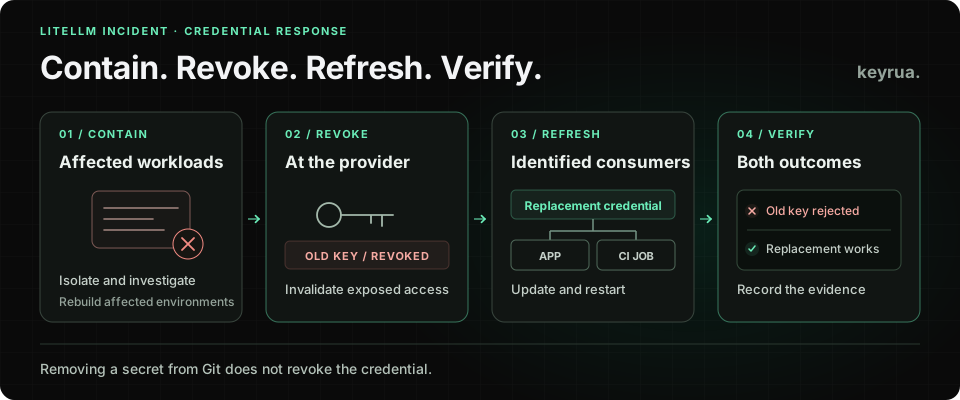
Treat exposure containment, credential invalidation, and application recovery as separate tasks with linked evidence:
- Contain the affected workload. Involve the incident owner, preserve the evidence needed for investigation, and stop giving the suspected environment fresh credentials. Use a known clean administrative environment for response actions.
- Invalidate exposed access at the issuer. For known exposed credentials, prioritize prompt revocation. Where continuity requires a brief replacement overlap, make the risk and duration an explicit incident decision; do not assume a routine rollout order is appropriate during active compromise.
- Create replacements with the required permissions. Reassess the scope while issuing them. A replacement should not automatically inherit unnecessary access simply because the old credential had it.
- Update every identified consumer in clean environments. Rebuild or recover the workloads according to the applicable incident procedure, then deploy the replacement configuration.
- Verify both outcomes. Confirm legitimate use of the replacement and rejection or issuer-confirmed revocation of the previous credential. Keep secret values out of the evidence.
OWASP describes revocation and rotation as central parts of secret-exposure response. The appropriate urgency depends on the exposure and the credential’s authority. See the OWASP secrets-management guidance.
A ticket that says “new key added” leaves the old key’s status unresolved. Record the provider, credential identifier, revocation time, and verification result. For identities that issue sessions or temporary credentials, check the issuer’s rules for invalidating existing sessions as well as disabling future issuance.
Reduce the authority available to agents and build jobs
A tool that creates a pull request needs a defined set of repository permissions. Review the actual identity behind that access: what it can read, what it can change, and whether it can modify workflows, publish artifacts, or administer the organization.
Keep application runtime credentials, repository automation, and release publishing identities separate where practical. Review the permissions against the work each one performs. A development helper should not inherit an organization owner’s authority as a convenient default.
For GitHub Actions, GitHub recommends a read-only repository-content default for GITHUB_TOKEN, with permissions increased for the individual jobs that require them. Its guidance also describes environment approval gates and OIDC for supported cloud providers, which can reduce the need to store long-lived cloud credentials. See the GitHub Actions secure-use reference.
These controls require a review of the whole job. Restricting GITHUB_TOKEN does not restrict a separate, powerful credential supplied to the same process. Likewise, an approval gate needs reviewers and identities whose access has not been compromised.
An agency can make this review part of starting a client project: who owns the repository, who owns releases, which automation may publish, and which credentials each job receives. Revisit it when adding an AI agent or another integration that can execute code.
Give each client and environment a clear credential boundary
Separate credentials make an incident easier to scope. A staging integration with access limited to staging creates a more manageable response than an account reused across multiple clients and production systems.
The separation must exist at the issuing service. Two differently named variables containing the same credential still grant the same access. A new key also needs its permissions checked; creating another key does not necessarily create a new authorization boundary.
For each client project, identify the provider account, environment, allowed operations, and responsible owner. Where a provider offers suitable expiry or spending controls, configure and test them according to its documented behavior. Avoid assuming every budget alert is a hard spending cap.
Our CI/CD secret-management guide covers organizing credentials around pipeline responsibilities. The developer offboarding checklist applies the same ownership discipline when people leave a project.
Keep shared configuration useful during the response
Once clean workloads and replacement credentials are ready, the team needs a clear place to retrieve the correct configuration for each project and environment.
Keyrua supports organizing environment variables by project and environment, importing and exporting .env files, and retrieving configuration through the CLI. That can help a team distribute replacement configuration through a known workflow. See the CLI documentation and security model.
Credential revocation still happens at the issuing provider. Existing exported files and running processes need to be refreshed or replaced. Keyrua’s CLI process injection supplies values to the launched process; code running with that process’s privileges can access the configuration it needs to operate. It does not make credentials unreachable to a compromised workload.
For your next client-project review, choose one important credential and trace its complete lifecycle. Identify its owner, every consumer, the place to revoke it, and the evidence that would prove a replacement rollout succeeded. Resolve the gaps while the application is healthy, so that the next incident begins with a usable record.