
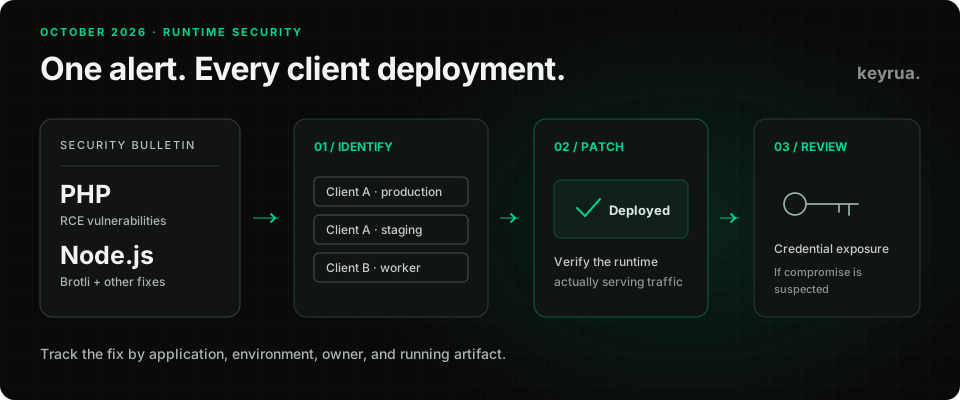
A security advisory lands while your agency is working on several client applications. Someone updates a Dockerfile. Another developer checks their laptop. A hosting provider says it is handling the issue.
The question that remains is uncomfortable: which client applications are still running a vulnerable runtime?
On October 21, 2026, PHP released fixes for two critical remote code execution vulnerabilities, and Node.js published a security release that includes a Brotli decoder memory corruption fix. PHP then published additional session configuration guidance on October 23. These are separate issues with different exposure conditions. They deserve a deployment-by-deployment response. See the PHP announcements and the Node.js October security release.
This guide covers the advisories available on October 24, 2026. Use the linked vendor advisories for subsequent changes. The goal is to give a development team a clear route from an alert to a verified deployment, including what to do about credentials if compromise is suspected.
The versions to check first
The following upstream releases contain the October 21 fixes discussed here:
| Runtime branch | Security release | Main issues covered in this guide |
|---|---|---|
| PHP 8.2 | 8.2.35 | CVE-2026-109618 and CVE-2026-109619 |
| PHP 8.3 | 8.3.36 | Same PHP CVEs |
| PHP 8.4 | 8.4.27 | Same PHP CVEs |
| PHP 8.5 | 8.5.12 | Same PHP CVEs |
| Node.js 22 | 22.23.4 | CVE-2026-111497 and other October fixes |
| Node.js 24 | 24.22.1 | CVE-2026-111497 and branch-applicable October fixes |
| Node.js 26 | 26.12.1 | CVE-2026-111497 and branch-applicable October fixes |
Sources: PHP affected and patched versions and Node.js release downloads.
Treat these as branch-specific patch targets for this release. The PHP rows do not resolve the separate October 23 follow-up described below. If your distribution or hosting provider backports fixes, check its package advisory and revision. An upstream version string alone may not establish whether a vendor package contains a fix.
PHP 8.1 and older are outside upstream support. Ask your vendor for its fix status and plan a supported upgrade. PHP 8.2 itself reaches upstream end of life on December 31, 2026. See PHP's support table.
PHP: two critical paths to remote code execution
These vulnerabilities are in PHP itself. Updating an application dependency is a different operation from replacing the interpreter serving requests.
CVE-2026-109618 concerns out-of-memory handling. A memory allocation failure can interrupt request processing while internal data is only partly initialized. Cleanup can subsequently act on that invalid state. PHP documents an application-independent attack path in Apache mod_php, before application code executes. Its analysis also identifies susceptibility in other server integrations, with different conditions and levels of demonstrated exploitation. See the PHP out-of-memory advisory.
CVE-2026-109619 concerns stale global state. A worker can retain a reference to memory belonging to a finished request. A later request handled by that worker can use it before initialization replaces it. The advisory describes several producers and consumers of this stale state; configuration and request handling affect which paths are reachable. See the PHP stale-state advisory.
PHP's update guidance covers PHP-FPM, Apache mod_php, CGI, FrankenPHP, and LiteSpeed, with the highest risk in mod_php. Being on FPM is not a reason to skip the update. Configuration mitigations cannot completely replace patching. Follow the PHP security team's instructions.
For an agency maintaining WordPress sites alongside custom PHP applications, assign the runtime update to whoever controls hosting. WordPress explicitly states that this is a PHP issue and that no WordPress release is required to address it. A current CMS dashboard is not evidence that its PHP interpreter has been patched. See WordPress's PHP security notice.
The October 23 follow-up: CVE-2026-115560
PHP recommends session.upload_progress.enabled=0 pending its next regular bugfix release. The additional RCE vector requires upload progress to remain enabled, a configured session.serialize_handler of php_binary or php_serialize, and application code switching that handler to php with ini_set() before session_start(). PHP describes this combination as unusual; applications that never switch the handler at runtime can keep upload progress enabled. A full advisory is planned with the next release. See the October 23 informational advisory.
Apply a required upload-progress change in configuration that takes effect before request parsing, then restart every worker. Setting it inside application code is too late for the early session paths described in the stale-state advisory. Record this follow-up separately from the October 21 package update so it does not disappear behind a completed patch ticket.
Node.js: the Brotli CVE depends on what your application decompresses
CVE-2026-111497 affects the Brotli decoder bundled with Node.js. Malformed compressed data can cause an out-of-bounds write when an application decompresses attacker-controlled Brotli input through node:zlib. The possible consequences include a crash, memory disclosure, or remote code execution. The Node.js project rates this issue high. See the Node.js advisory and Google's underlying Brotli CVE record.
For exposure triage, inspect routes and jobs that decompress incoming uploads or downloaded data. Trace who can control those bytes. Merely serving Brotli-compressed responses does not establish that an application reaches the vulnerable decoding path.
The same release also fixes DNS name truncation, TLS hostname verification problems, and other issues. Assess the full bundle against your application's APIs; finding no Brotli decoding path does not dispose of the other fixes. The 24.22.1 release notes list its changes, and the full security bulletin describes the separate conditions across branches.
Updating an npm package does not by itself replace Node.js in a container, process manager, CI runner, or managed host. Identify how each deployment receives its runtime and update that layer.
For an agency, the difficult part is finding every running copy
Consider a hypothetical client project with a PHP website, a Node.js integration worker, and a staging environment used for demonstrations. The website and worker may be deployed by different people. Staging may use a different image. A scheduled job may run somewhere neither developer checked.
Closing the website's update ticket would leave the rest unresolved.
Create one row per deployed service and environment. A useful record contains:
| Field | What to record |
|---|---|
| Application and environment | The client project, service, and deployment URL or identifier |
| Runtime evidence | Running version, vendor package revision, or immutable image digest |
| Exposure | Applicable advisory conditions and the evidence checked |
| Owner | The person or provider responsible for the update |
| Fix evidence | Advisory reference, deployed artifact, and replacement time |
| Verification | Runtime check and application smoke-check result |
Include previews, background workers, scheduled tasks, and build systems where those runtimes are used. Give uncertain entries an owner and a next action. “The provider manages that” needs a provider confirmation that identifies the affected service and fix.
Keep this record free of credential values. A response tracker needs enough context to establish coverage; it should not become another place where production secrets are copied.
Verify the runtime that serves the application
These commands provide a starting point when executed in the relevant deployment context:
php --version
node --version
A result on your laptop describes your laptop. A shell on a server can also point to a different PHP installation from its web server or FPM pool. Confirm the binary or package used by the actual service through deployment records, service configuration, or your provider's diagnostic tools. Avoid publishing a phpinfo() page as a shortcut.
For containers, rebuild with the patched runtime and deploy the resulting image. Confirm that the running instances use that image, including workers that may live longer than web requests. For managed platforms, check the provider's security notice and whether an existing deployment needs replacement to receive the fix.
After replacing or restarting the affected processes, exercise the application's ordinary behavior: authentication, database access, uploads where relevant, and a representative background job. Record when the check happened and which artifact it covered.
If you need to roll back application code, retain a patched runtime in the rollback artifact. Otherwise, resolving an unrelated regression could quietly reintroduce the vulnerable interpreter.
When should you rotate secrets?
A vulnerable version establishes exposure to assess. It does not, by itself, prove that credentials were stolen. If there is evidence or credible suspicion of compromise, treat the response as an incident: contain the affected workload, preserve relevant evidence, and identify the credentials it could access.
Environment variables remain accessible to the application using them. Node.js, for example, exposes the process environment through process.env. Injecting a credential at startup does not protect it from code running with that application's privileges.
For potentially exposed credentials, revoke or rotate them at the issuing service, distribute replacements through your normal secure workflow, and verify that the old credentials are rejected. Contain the compromise before giving the affected workload fresh credentials. OWASP's secrets management guidance covers revocation, rotation, and incident records.
The scope matters. A staging application using its own narrowly scoped credentials creates a different response from one sharing a production database account with several clients. Document consumers and permissions before an emergency so the team can make that distinction quickly.
Make configuration easier to recover when the pressure is on
During an incident, searching Slack for the current .env file adds another uncertainty. The team needs to know which values belong to the affected project and environment, where they are consumed, and who can replace them.
Keyrua gives teams a shared place to organize environment variables by project and environment, import and export .env files, and retrieve configuration through the CLI. It can support the configuration distribution part of a response. Runtime patching and credential revocation still happen in your deployment system and at the credential provider. See the Keyrua workflow and security model.
When a value changes, refresh exported files and restart or relaunch processes with the replacement configuration. Existing files and processes do not update automatically. Our environment variable guide covers maintaining that workflow between incidents.
For this week's updates, give every affected client deployment an owner, a patch target, and evidence from the running service. That is what lets an agency answer the next client who asks whether their application has been updated.