
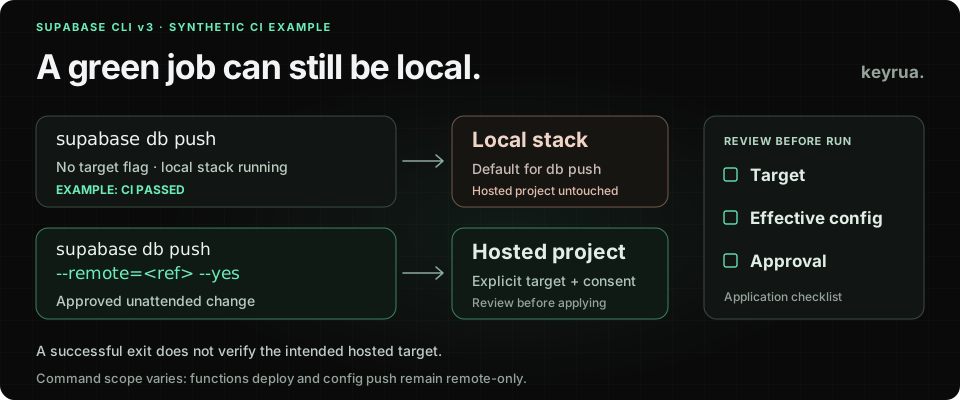
A deployment job starts a local Supabase stack for tests, then runs supabase db push. The command succeeds. The hosted client database has received no migration.
That is a documented consequence of Supabase CLI v3's new database-command default. If no local stack is running, the bare command fails instead. A successful run against an available local stack is the case an agency needs to distinguish from a successful client deployment.
Supabase published its breaking-change announcement on November 4, 2026. The release itself arrived on November 2, with the default Homebrew installation switching on November 3. This is a CLI migration, not evidence of a hosted service incident or a change automatically applied to every project's data.
For a team maintaining several client pipelines, the review has three parts: the selected target, the settings that win after configuration resolution, and the approval for hosted changes. This guide uses primary documentation reviewed November 4. Examples and checks below are proposed workflow changes, not results from a live Supabase deployment.
Record which binary each client job installs
Start with the installer and the resolved version. A repository can have a reviewed application dependency update while its deployment job downloads a newer CLI independently.
The v3 migration guide describes an important supabase/setup-cli distinction: omitting version normally installs latest, but a supported root lockfile pinning supabase can determine the version. The action's major version and the installed CLI major are separate choices.
Build a small record for each client job:
Client/project: client-demo-a
Job: hosted-migrations
Installer and version selection: pending review
Resolved Supabase CLI version: pending verification
Intended hosted project reference: approved project reference
Does the job start a local stack? yes / no
Target and configuration review owner: application team
Hosted verification evidence: pending
This is a synthetic template. Record credential references and owners rather than secret values. Include scheduled maintenance, preview deployment and developer-run scripts if they install their own CLI.
An agency-wide rollout needs an owner for the shared workflow and an owner for each client target. Updating a reusable job does not establish that every caller supplies the intended project and configuration.
Keep target selection separate from hosted approval
The local and hosted project guide separates three command types. Commands that can run locally default to the local stack. Remote-only commands, including functions deploy, secrets set and config push, still use a hosted project. Local-only commands do not accept a remote target.
For database work, choose the target explicitly. A bare --remote selects the linked project; SUPABASE_PROJECT_ID can override the saved link. An explicit --remote=<project-ref> selects that project. Attach the value with =.
These examples assume v3, approved credentials and a reviewed project reference in APPROVED_PROJECT_REF. That variable is an illustrative team-defined input, not a special Supabase setting:
| Purpose | Illustrative command |
|---|---|
| Inspect hosted migration history | supabase migration list --remote="$APPROVED_PROJECT_REF" |
| Review pending database work | supabase db push --dry-run --remote="$APPROVED_PROJECT_REF" |
| Apply the reviewed work in an approved unattended job | supabase db push --remote="$APPROVED_PROJECT_REF" --yes |
The official CI migration reference documents this separation. --remote chooses the database destination; --yes supplies unattended confirmation for a hosted mutation. Adding only one does not express both decisions.
Use the project reference approved for that client. A [remotes.production] configuration block is not selected simply by passing the word production: --remote=production is interpreted as a branch selector. Resolve the actual target and the matching configuration before treating a name as evidence.
Review the environment that reaches the CLI
A correct target can still receive unintended configuration. In v3, the precedence is:
command-line flags
  > shell environment
  > project environment files
  > configuration file, including the matched remote block
  > defaults
Consider a synthetic case: the production remote block contains the reviewed authentication site URL, while the job inherits a SUPABASE_AUTH_SITE_URL intended for another environment. The environment value now wins. The issue is the effective setting sent to the selected project; it does not require the project target itself to be wrong.
Supabase's migration guide explicitly calls out remote-block overrides and recommends reviewing config diff before the first v3 config push. Inspect that diff in the authorized context. Record changed setting names and their sources without copying sensitive values into a public build report.
For each deployment job, review four places:
- The variables supplied by the CI job and its selected environment.
- The variables inherited from reusable workflows or the parent shell.
- The project environment files available in the job's workspace.
- The remote block that matches the resolved target's project reference.
Set SUPABASE_ENV deliberately. Keep developer-local environment files out of CI workspaces. A file labeled for production does not establish that its values outrank every other available source.
Supabase also supports environment references within config.toml. Keep actual secret material outside version control. During this migration, document both the source of each sensitive value and the resolution rules that decide when it is used.
The useful review artifact is a short list of settings whose winning source changed. A full environment dump creates another place for credentials to persist and makes that comparison harder to review.
Give unattended changes a specific approval path
V3 hosted mutations fail when the CLI cannot prompt unless unattended consent is supplied. A piped y no longer supplies that consent. The detailed confirmation documentation also covers agent detection and the exceptions to interactive prompt defaults.
For an agency's established CI deployment, put confirmation at the step that applies the reviewed change, after the target and configuration checks. Keep the CI environment approval and the actual command visible in the release record.
For an interactive AI coding task, inspect the proposed command, target and effects before authorizing a hosted mutation. HostedMutationConsentRequiredError reports missing CLI consent; review the command and existing authorization before supplying it. Keep that decision specific to the proposed operation.
Prefer the explicit command flag in an approved job over a blanket consent variable shared with unrelated work. --yes is an execution input. It does not prove that the target belongs to the client, that the SQL is appropriate, or that a reviewer approved every inherited setting.
Include configuration and SQL changes in the upgrade review
Target flags are only part of this major-version migration. The v3 announcement also identifies the move to pg-delta as the default diff engine and removal of deprecated configuration and commands.
Review generated SQL as an upgrade output. A command that completes successfully can still produce a different migration than the one your team expected from its previous toolchain. Assign review of that SQL before it becomes part of a client release.
Older repositories may also need [inbucket] renamed to [local_smtp]. Check the migration guide against the actual repository rather than applying a replacement blindly across unrelated configuration. Supabase recommends using the latest v2 release's warnings before upgrading; those warnings do not cover every changed behavior.
If a client needs a later migration window, Supabase documents v2 channels such as v2.stable. Record the resolved version tested by the job: a supported major channel is not an immutable release pin. Keep the temporary version decision and the planned v3 work in the same client release record.
Verify the hosted result before closing the release
A useful staging evaluation should cover the job shapes that actually exist in your agency:
| Case to evaluate | Evidence to collect |
|---|---|
| Tests start a local stack before deployment | Database step resolves to the intended hosted project, rather than merely returning success locally |
| A reusable workflow supplies configuration | Effective settings come from the reviewed source for this client |
| A hosted change runs unattended | Approved apply step has explicit consent; missing consent fails rather than being silently ignored |
| The upgraded diff engine generates SQL | Reviewed migration artifact matches the intended application change |
These are suggested checks, not a reproduced test matrix. Use a staging project and synthetic fixtures for the evaluation. Then verify the real hosted migration history and the application's expected behavior through the client's normal release process.
Retain the resolved CLI version, target evidence, reviewed configuration differences, applied migration identifiers and follow-up owner. A rollback plan should reflect the database change itself; reinstalling an older CLI does not undo SQL already applied.
Where Keyrua fits in the configuration review
Keyrua gives a team a maintained place for configuration organized by project and environment. An agency can use that structure to keep each client's approved shared values and configuration references accessible to the right project members. The documentation and security model describe the actual access boundaries.
The CLI retrieves values before starting a child process and merges them with its inherited environment. It does not make Supabase select a hosted target, remove every inherited variable, or refresh a running child when a stored value changes.
Project assignments cover all environments within that Keyrua project, and organization administrators inherit project access. Keyrua does not supply Supabase provider permissions, approve a hosted mutation, or revoke credentials at Supabase.
The CI/CD configuration guide covers the wider pipeline handoff. For this upgrade, close the release with evidence for three concrete decisions: which client target received the command, which settings won, and which hosted changes were approved and verified.