
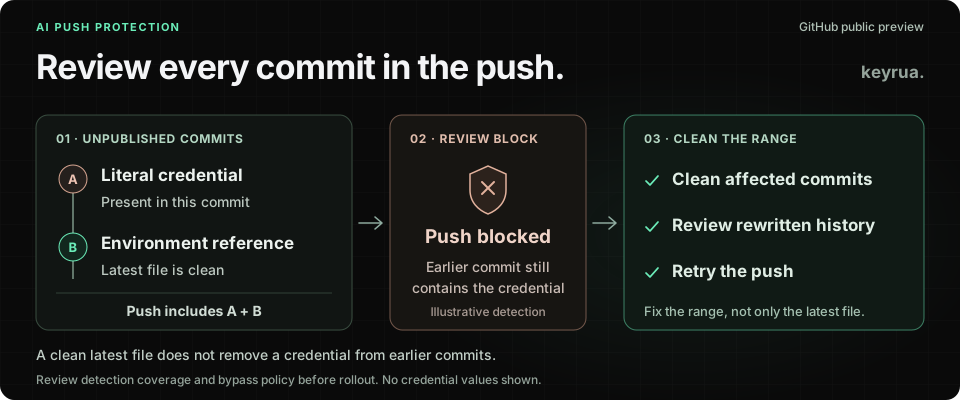
A developer replaces a hardcoded database password with an environment variable. The latest file looks right. The push still contains the earlier commit that introduced the password.
This is a synthetic example, not a reported client incident. It captures a distinction that matters when a delivery is blocked: fixing the current file and removing a secret from the commits being pushed are different operations.
On October 28, 2026, GitHub announced push protection for AI-detected secrets in public preview. It uses surrounding code to identify potential secrets without relying on a known token format. A password does not need a familiar provider prefix to deserve attention.
For an agency, enabling the feature should come with a practical response plan. The developer needs a way to resolve a block, the client needs an owner for the configuration, and the account owner needs to understand the additional usage cost.
This guide uses documentation reviewed on October 29, 2026. The rollout and evaluation steps below are recommendations; this article does not report a live preview test.
Establish what is enabled for each client repository
The new classifier runs alongside existing pattern-based detection. The launch describes coverage for pushes, GitHub UI commits and file uploads. It is off by default, and the preview is available to organizations with GitHub Secret Protection or GitHub Advanced Security on github.com. Do not assume that a developer’s default public-repository protection means this preview is active everywhere they work.
GitHub’s enablement documentation lists three prerequisites: the relevant security product, push protection, and scanning for AI-detected secrets. The additional AI push-protection setting must then be enabled. Account policies and the actual applied configuration matter.
Keep a small repository inventory before a rollout:
| Repository record | What the agency should establish |
|---|---|
| Owner and administrator | Which client or agency organization owns the repository and who can approve configuration changes |
| Current protection | Whether the prerequisites and new preview setting are actually enabled |
| Credential owner | Who can replace a real credential at its issuing service |
| Block reviewer | Who reviews uncertain detections and any permitted bypass request |
| Billing owner | Which account reviews usage, budgets and the cost of the pilot |
These are operational records to maintain, not extra GitHub settings invented by this guide. A repository can have strong protection while still lacking a person who can answer whether a flagged value is live.
Budget for scans that do not block anything
The current billing documentation says AI push protection consumes Secret Protection AI credits according to the amount of file content scanned. A scanned push can consume credits even when no potential secret is found.
That changes the pilot’s cost question. Counting blocked pushes alone will not explain usage. Identify the organization that owns the repository and the applicable billing account, then review its included credits, metered usage and budget controls before enabling the feature across client work.
For an agency managing several client organizations, record the decision separately for each account. An approval to evaluate a feature in your own organization does not establish who pays for enabling it in a client’s organization.
GitHub distinguishes this new credit-consuming check from AI-detected post-push alerts, which remain included with the relevant security license. Avoid treating all AI secret scanning as one billing category. If the intention is to cap metered spending, check the documented stop-usage setting rather than relying on an alert alone.
Use a bounded pilot to learn what your repository actually consumes. This article provides no cost estimate or measured scan rate.
A clean final diff does not clean the commit range
Consider this illustrative local history:
Commit A: add database configuration with a literal password
Commit B: replace the literal with DEMO_DATABASE_PASSWORD
Push:     A + B
Commit B improves the application’s current configuration. Commit A still carries the earlier value into the proposed push. This is why the command-line remediation guide requires removing a secret from every commit where it appears.
Start with the locations in the block message. Determine whether the affected commits are unpublished local work or already shared history. For unpublished work, use the appropriate amend or rebase procedure to repair the affected commits, then review the resulting changes before retrying. A cleanup commit added at the end does not remove the value from the earlier commits.
Shared history needs coordination with the repository owner. Rewriting it affects other developers and cannot establish that existing copies have disappeared. Do not turn a blocked-push response into an unreviewed force push across a client repository.
Also keep the value out of the support conversation. A useful escalation contains the repository, affected commit references, file paths, credential owner and observed outcome. Copying the password into a ticket or chat creates another place that needs handling.
Separate the detection decision from the exposure decision
A classifier finding is a reason to investigate. It does not, by itself, establish whether a credential is active, where else it has been copied, or which system can revoke it.
Use the finding to answer two questions: is this value a credential, and has it reached a place where it should no longer be trusted?
| Finding | Practical response |
|---|---|
| Real credential in unpublished work | Remove it from the affected commits, identify its owner, and assess other exposure before retrying |
| Real credential already published or otherwise exposed | Start issuer-side revocation or replacement according to the incident plan; clean repository history as a separate task |
| Verified inert fixture or false positive | Document the reason and use the repository’s permitted review process if an exception is needed |
| Uncertain value | Hold the push and ask the credential or application owner to establish what it is |
The table is an agency triage recommendation. A block on this push says nothing conclusive about yesterday’s logs, a pasted support message or another remote. A later successful push also does not certify that the application contains no secrets.
If a credential has been exposed, invalidate it through the system that issued it and verify affected consumers. Deleting it from a file does not revoke it. Our credential-rotation guide covers that separate operational sequence.
Decide who can authorize an exception
GitHub documents bypass and delegated-bypass controls. Repository-level bypasses have alert and audit behavior, and the default permissions may be broader than your client’s intended approval process. Review the effective policy before telling teammates that every exception reaches a separate reviewer.
Write down what evidence a reviewer needs for a false positive or test fixture. A claim that a value is “only for staging” is insufficient if it still authenticates to a real service. A test credential connected to a real account remains a credential.
Include coding agents in the same operational rule. An agent should report the block and follow the team’s authorized cleanup workflow. Uncertain findings and any proposed bypass or workaround need the appropriate reviewer decision. It should not encode the value, split it across strings or repeatedly alter the code to evade detection. GitHub’s launch explicitly requires authorization before an agent bypasses or works around a block.
This is a workflow to document and enforce through the controls available to your team. A sentence in an agent prompt is not evidence that the repository’s bypass permissions have changed.
Run a pilot with inert fixtures
Choose a disposable repository with the approved preview configuration and a named reviewer. Use synthetic values that have never authenticated to a service. Do not create a real credential leak to demonstrate prevention.
An initial evaluation can cover four cases:
- Ordinary change: confirm normal work can proceed and record the observed usage.
- Inert credential-shaped fixture: observe whether the classifier flags it in realistic configuration context. Do not promise a deterministic match for an invented string.
- Earlier-commit fixture: if the fixture is flagged, remove it only from the latest file, observe the result, then clean all affected unpublished commits and retry.
- Review path: confirm the intended human can handle an uncertain finding and that contributors understand the effective exception policy.
Record the preview settings, test date, commit references, outcome and reviewer decision without secret values. If an inert fixture is not detected, the result describes that fixture and context. It does not establish that all passwords pass or that all real credentials would be caught.
GitHub’s detection-scope reference also documents general push-protection limits, including scans that can time out on large pushes. Keep existing review and credential-handling practices during the pilot. A detector is useful without being a guarantee of complete coverage.
Review the pilot’s findings, bypass decisions, support burden and actual credit usage before expanding it. Those observations are more useful than adopting a vendor’s early benchmark as a forecast for your clients.
Give developers a maintained route to configuration
After removing a literal password, the application still needs its configuration. An agency has not finished the handover if the replacement instruction is “ask someone for the right value.”
Keep variable names and setup instructions in the repository, with values supplied through the team’s approved configuration workflow. Our environment-variable guide and CI/CD guide cover the application and pipeline sides of that separation.
Keyrua can organize configuration by project and environment and provide values to authorized API or CLI consumers. Its CLI can supply configuration when launching a process. That gives a developer a maintained retrieval path instead of another password pasted into a conversation. See the documentation.
Preserve the access boundaries when choosing this workflow. Ordinary members need project access, organization administrators inherit it, and project assignments cover all environments in the project. The launched process receives real values. Keyrua does not scan Git history, change GitHub’s detection or bypass policies, or revoke credentials at their issuing services. Its security documentation explains authorized access and storage behavior.
Start with one client repository. Confirm the preview and billing settings, name the reviewer and credential owner, and make the blocked-push response part of the setup guide. The next developer should know how to resolve the finding and where the application’s configuration belongs.