
A client asks your agency for a dashboard showing deployment health. Someone connects it using an API key that already works in the release pipeline. The dashboard is useful, the ticket closes, and the credential now serves two very different jobs.
This is a hypothetical example, but it captures a familiar shortcut: choosing a credential because it is available, then leaving its authority unexamined. A system that reports deployment status may end up holding the same power as the system that changes production.
Render announced Scoped API Keys in private beta on October 27, 2026. The useful agency question is concrete: what should each integration be able to do for this client, and how will we verify that boundary?
This guide uses primary documentation reviewed on October 28, 2026. The example inventory and test plan are recommendations, not a tested Render integration.
What the private beta changes
Render’s announcement introduces keys with selected API capabilities. Access is available by request, with limited beta capacity. Treat adoption as an evaluation until your workspace has access and your integrations have passed validation.
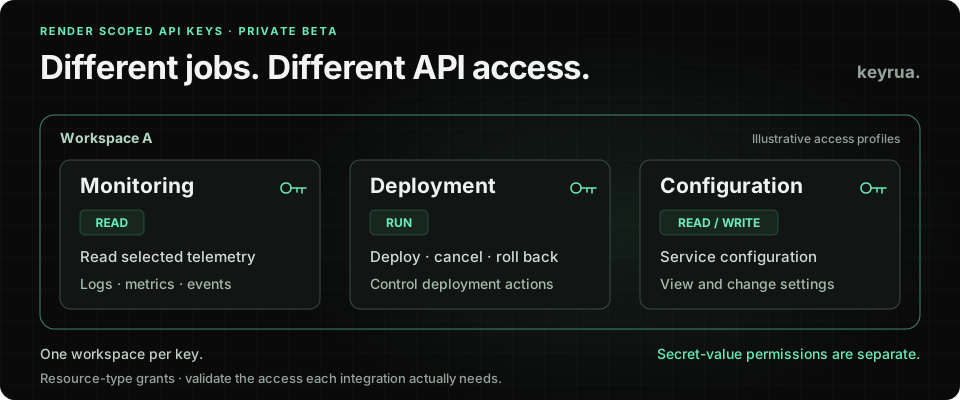
The Scoped API Keys documentation describes one workspace per key and separate grants for service configuration, service secrets, deploys and monitoring. Effective access also depends on the creator’s workspace role; changing that role changes the key’s access.
Two details deserve attention before migrating anything. The documented Deploys: Run grant covers viewing history, triggering deployments, cancelling them and rolling back. It is broader than a button that starts one release. Separately, existing classic keys continue unchanged. Joining the beta does not narrow a credential already copied into a dashboard or CI job.
That gives agencies an opportunity to revisit their credential inventory. It does not remove the need to understand each consumer.
Start with the integration’s job
List the operations an integration actually needs before choosing its grants. A name such as client-a-monitoring describes your intention. The provider’s authorization checks determine what the key can do.
Use a matrix like this as a starting point. The examples are synthetic, and the grant labels refer to the beta documentation rather than invented API scope identifiers.
| Consumer | Intended job | Starting grant to evaluate | Boundary to verify |
|---|---|---|---|
| Health dashboard | Read operational signals | Monitoring: Read | Cannot retrieve secret values or perform deployments |
| Release job | Deploy an approved release | Deploys: Run | Cannot change configuration or retrieve secret values; cancellation and rollback are also within the documented grant |
| Configuration migration | Apply an approved configuration change | Relevant configuration grants; secret grants only if the task requires them | No unrelated administration rights; retire the credential when the task ends |
The matrix is a review aid. It is not proof that those grants alone satisfy every endpoint or SDK used by your tooling. A deployment integration may make a preliminary service lookup, for example. Identify that dependency, then evaluate the smallest additional grant needed.
Avoid solving a failed request by restoring every permission. Capture the operation that failed, confirm why the integration needs it, and update the inventory alongside the grant. This leaves the next maintainer with a reason for the access they inherit.
For a migration, distinguish changing ordinary configuration from reading existing secret values. Render’s secret Read & write grant includes permission to read values; your migration client can still avoid exporting them unnecessarily. An operation that sets a new value does not establish a business need to export every current value first. Check the client’s actual requests as well as the authority its credential holds.
A workspace boundary needs deliberate design
The beta documentation describes grants by resource type and action within a workspace. It does not document an individual-service, project or environment allowlist for each key. Do not promise a client that a carefully named key is restricted to one of their services on that basis.
If your agency keeps multiple clients in a workspace, a resource-type grant may be broader than the client assignment you intended. Compare your client-separation requirement with the provider’s documented boundaries. Where they differ, review workspace organization and supported access controls before issuing the credential.
The same applies to staging and production. A label containing staging is not an environment restriction. Review the workspace’s other authorization controls as well; do not infer that an API grant overrides them or replaces them.
Record who created the key. Because the creator’s role affects access, a teammate’s role change can affect an integration even when the credential value has not changed. Include that dependency in your developer offboarding checklist and assign an owner who can maintain the integration after a handover.
Deployment authority deserves a separate review
Denying direct secret retrieval is useful. It does not establish that the integration can never reach sensitive data through another path.
Consider a release system that can select code or an image and cause it to execute in an application environment. If an attacker controls that selection as well as the required deployment authority, attacker-controlled application code may be able to read credentials supplied to the runtime. The required combination depends on the service’s build source, release controls and permissions. Possessing a deployment key alone does not prove an attacker can substitute arbitrary code.
Render’s deployment documentation describes deployment paths for linked source commits and container images. Review the path your release job actually uses. Which identity can change the source? Who approves production releases? Which runtime credentials would the resulting process receive?
For the agency, this connects repository access, artifact selection, deployment access and runtime configuration. Review them together when deciding who can ship a client application. A narrow API key can reduce one part of that authority without securing every step of the release chain.
Monitoring also needs judgment. Logs can contain customer information or accidentally logged credentials. Treat their readers as recipients of potentially sensitive operational data, and fix unsafe logging at the application. A read grant is meaningful access even when it cannot mutate infrastructure.
Test what must fail as well as what must work
Perform an evaluation in disposable test resources with dummy credentials. Do not use a production deployment as the target for a request that you expect to be denied: if the grant is broader than expected, the request could succeed.
For each consumer, write down an allowed operation and at least one forbidden operation before testing. A useful initial set is:
- Expected read: the monitoring consumer obtains the signal it needs from a test service.
- Secret boundary: that consumer cannot retrieve a dummy secret through the relevant API operation.
- Mutation boundary: it cannot perform an unwanted operation against disposable test infrastructure.
- Workspace boundary: it cannot access a fixture in another workspace.
- Release behavior: the release consumer can perform its intended deployment flow, including required lookups, without unrelated grants.
- Creator dependency: a planned role change produces the access behavior your team expects in the test setup.
Record the endpoint or client operation, expected result, observed result and credential reference. Keep authorization headers and returned secret values out of the evidence. Do not assume every denial uses the same status code or that a successful request proves all intended restrictions.
If a required capability is unavailable in the beta, document the gap. Keep the evaluation bounded rather than quietly granting broad access and calling the migration complete. Early-access behavior can change, so retain the review date and rerun the relevant checks after changes that affect your integration.
Replace shared credentials without losing the owner
Once the scoped integration works in the test setup, inventory the existing credential’s consumers before changing a live job. A dashboard, a local script and a scheduled report may all depend on a key that your team associates with “the CI token.”
For routine migration, create separate credentials for separate jobs, update each consumer deliberately, and verify its next real execution. Revoke the old credential at Render when the migration is complete. Render’s API documentation states that revocation takes effect immediately. An active compromise requires an incident response decision about containment; do not keep a suspected stolen key working merely to preserve the migration schedule.
A small ownership record makes the change easier to maintain:
Integration: client-demo-a / release pipeline
Provider workspace: workspace-demo-a
Purpose: deploy approved application releases
Credential reference: RENDER_RELEASE_API_KEY
Owner: platform team
Creator dependency: recorded in restricted credential inventory
Expected operations: documented release flow and required lookups
Forbidden operations: direct secret retrieval and configuration changes
Validation status: pending / disposable staging fixtures required
Next review trigger: owner, provider role or integration changes
This is an illustrative inventory template; no such integration was executed for this article. Add the validation date and evidence after performing the checks, and store the actual credential value separately. For a fuller provider-revocation and consumer-verification sequence, see our credential rotation guide.
Where Keyrua fits in this workflow
Once you have several purpose-specific credentials, teammates need a clear place to find the current configuration for each project and environment. Putting the replacement value into another chat thread recreates the handover problem.
Keyrua can organize those values and distribute them through its documented API and CLI workflows. A project can use explicit variable names such as RENDER_MONITORING_API_KEY and RENDER_RELEASE_API_KEY, with the purpose and owner recorded in your operational documentation. See the Keyrua documentation and CI/CD secret-management guide.
Keep the access boundaries precise. Keyrua project assignments cover all environments in that project, and organization administrators inherit project access. CLI process injection gives the launched process the actual configuration values. It does not prevent that process from reading them.
Render controls the provider permissions and revocation of its keys. Keyrua does not configure those scopes, revoke credentials at Render, or erase copies already exported to another system. Our security documentation explains the storage and authorized-access boundaries.
Start with one integration that currently uses a shared key. Write down its real operations, its client boundary and an action that must fail. That gives your team a concrete migration to evaluate, and the next developer a credential whose purpose they can understand.